Restaurant reservations solution to help you manage your daily bookings.
Alex Reservations is an easy-to-use WordPress restaurant reservations platform plugin.
It will streamline your entire booking process and will save time for both the restaurant and the customer.
Key Features
Efficient management of daily reservations for single or multiple locations
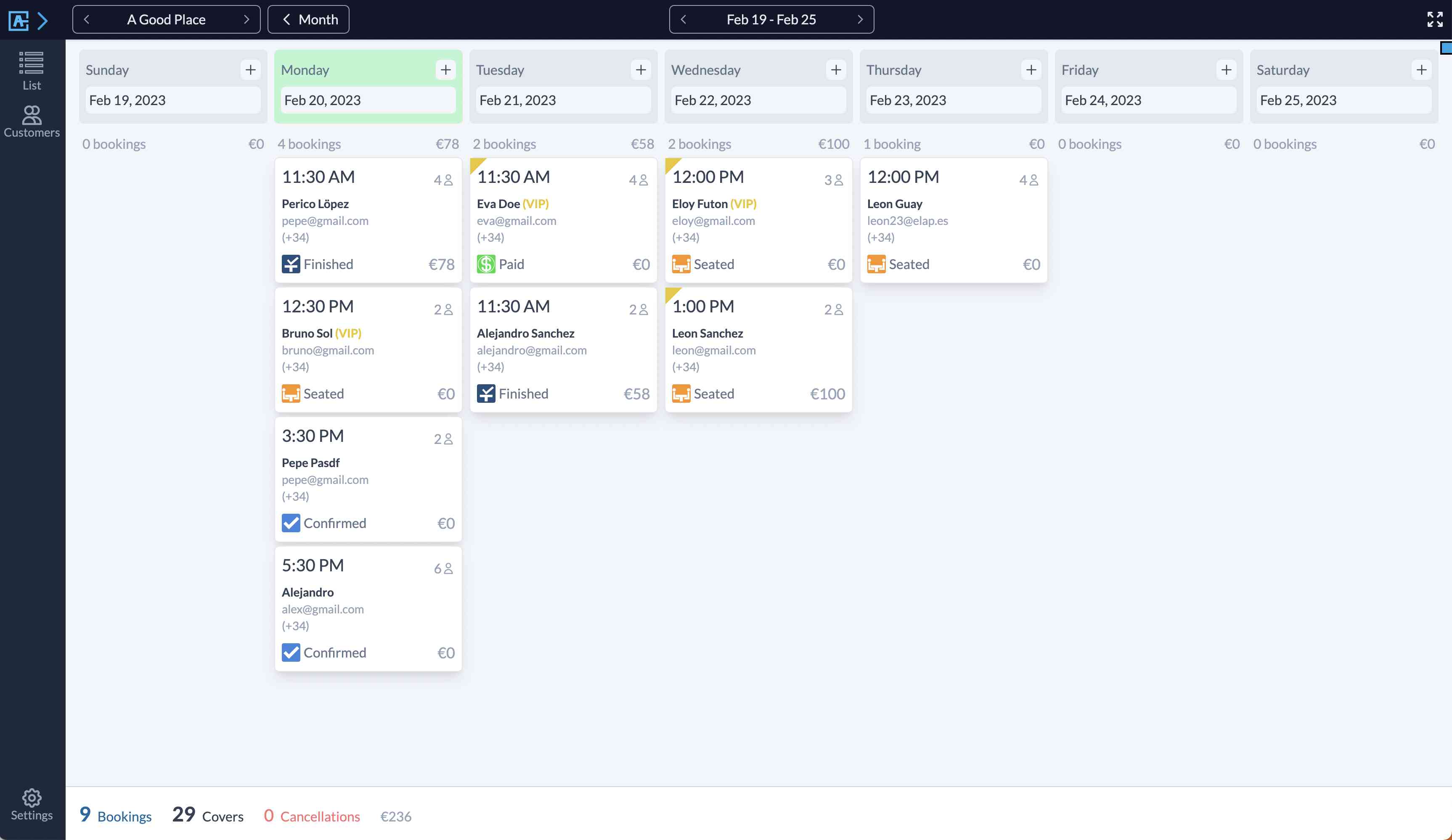
Interactive dashboard with floor plan, monthly, weekly, and timeline views
Create multiple schedules with customizable availability
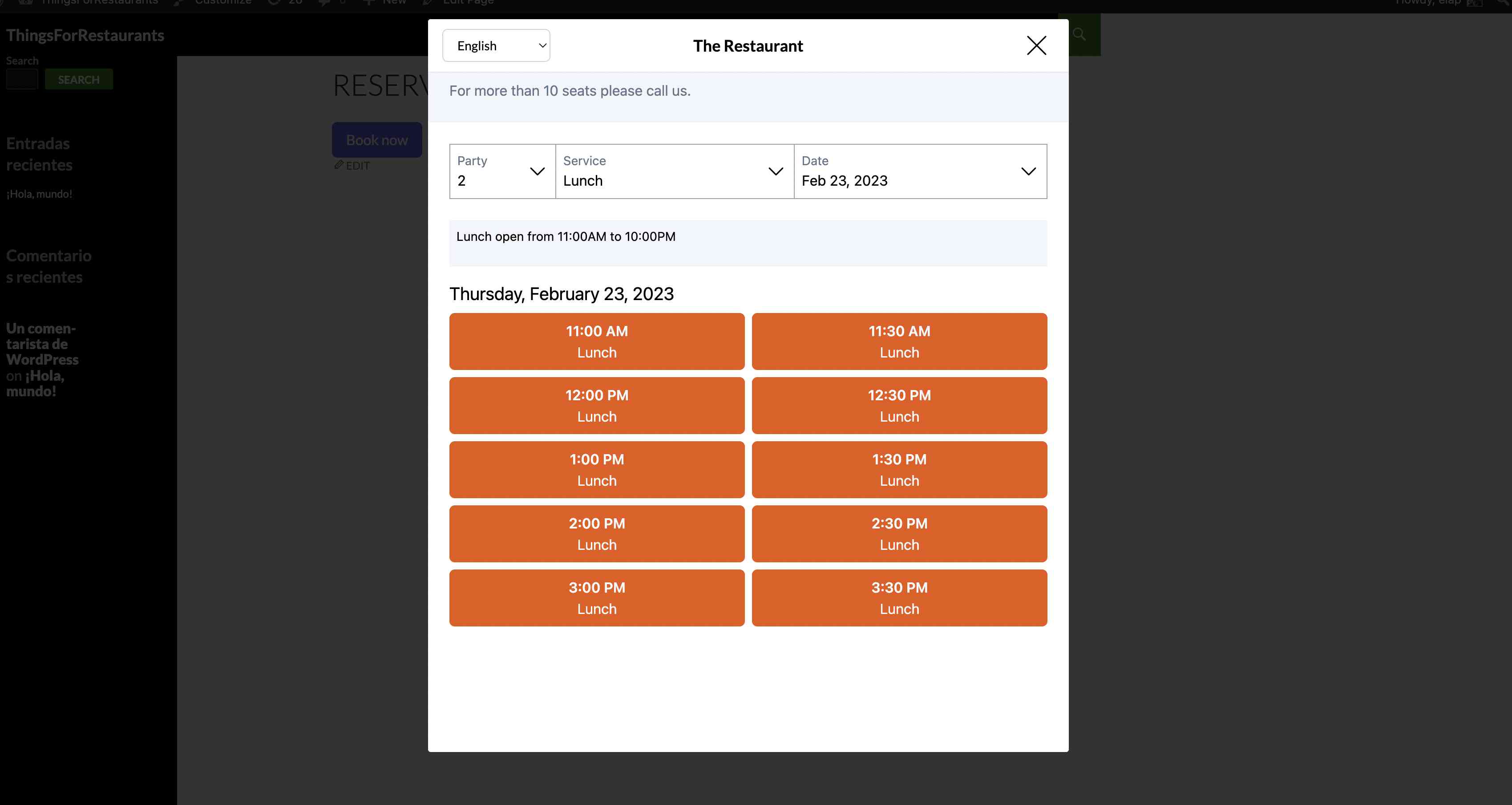
Customizable booking widget for your website
Special event organization (Mother’s Day, wine tastings, themed nights)
Automated and customizable email system
Reminders to reduce customer no-shows
Culinary and seating preference options for customers
Integrated CRM for tagging and exporting customer data
Multi-site environment compatibility for SAAS solutions
Benefits of Alex Reservations
Workflow Optimization: Manage all your reservations from a single intuitive dashboard.
Enhanced Customer Experience: Offer diners the ability to customize their bookings.
Reduced No-Shows: Automatic reminder system to maximize attendance.
Data Analytics: Gain valuable insights about your customers to improve your marketing.
Scalability: Perfect for single restaurants or multi-location chains.
Increased Revenue: Maximize table utilization and minimize empty seats.
Brand Consistency: Customizable emails and widget to match your restaurant’s branding.
Time-Saving: Automate repetitive tasks and focus on providing great dining experiences.
Who Can Benefit?
Independent Restaurants
Restaurant Chains
Fine Dining Establishments
Cafes and Bistros
Event Spaces
Restaurant Management Companies
SAAS Providers for the Restaurant Industry
Elevate your restaurant’s booking system with Alex Reservations. From small cafes to large chains, our plugin adapts to your needs, providing a seamless reservation experience for both staff and customers. Say goodbye to booking headaches and hello to efficient, customer-focused reservation management.
Try Alex Reservations today and transform the way you handle bookings!
Features included with the Alex Reservations Free Edition for restaurant reservations:
Limited Bookings – Receive and manage reservations from your venue.
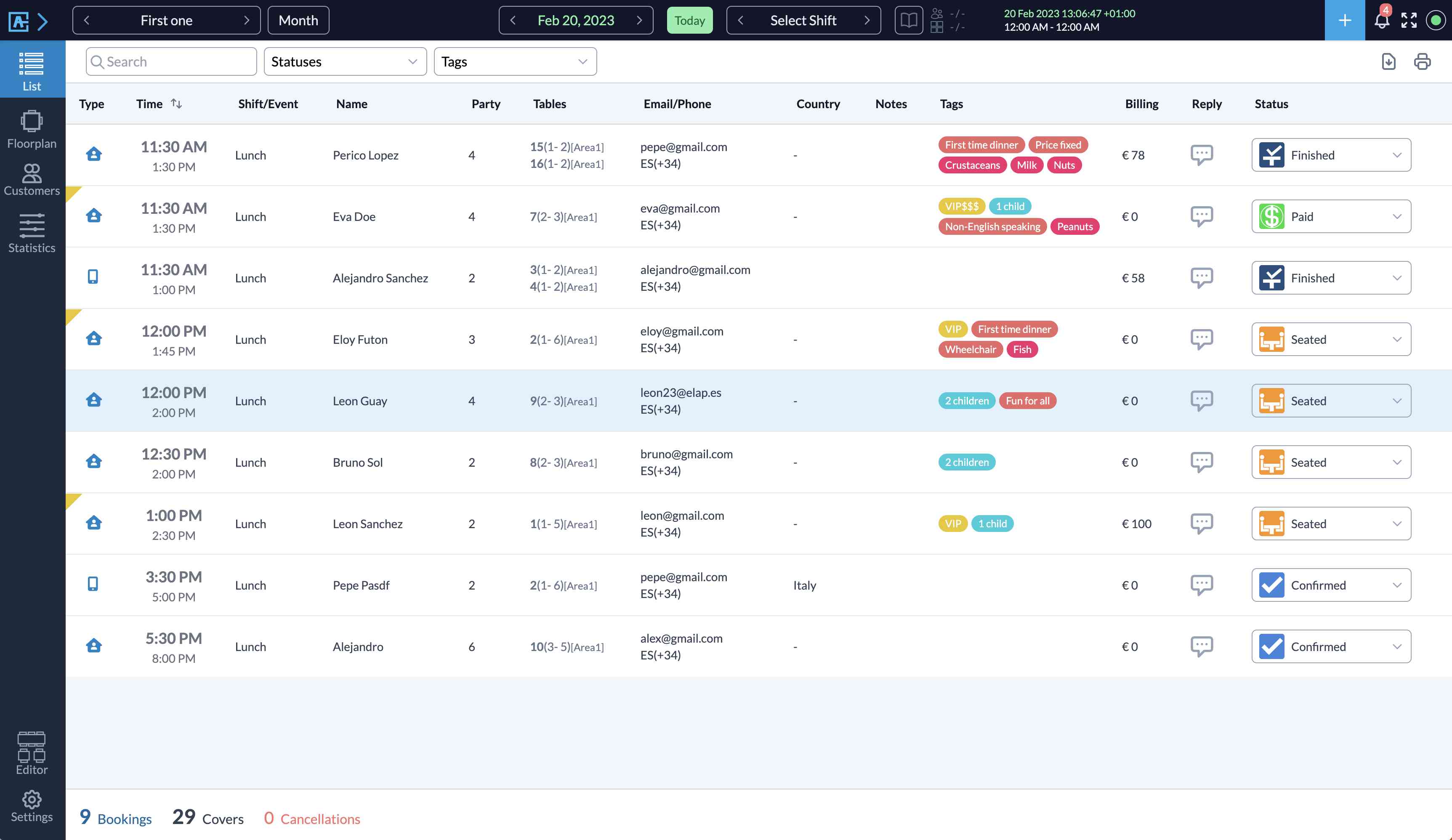
Bookings List View — Manage the daily list of reservations and create/update them from the same list. Filter them by customer, tags or status.
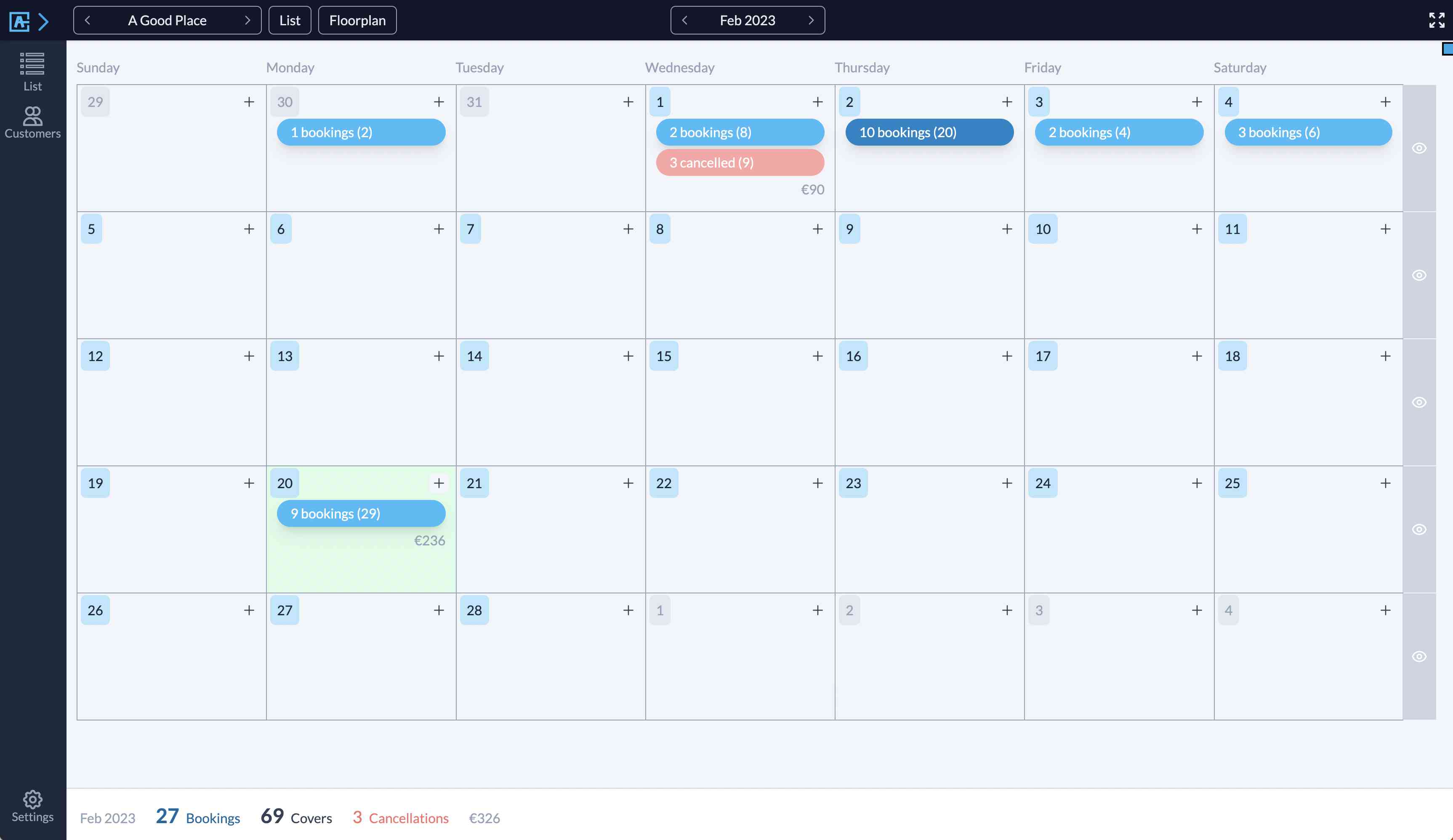
Monthly View — General view of monthly reservations. Add or update reservations directly in the view.
Weekly View — Jump from the monthly view to the weekly view. Show a list of daily reservations per column/day.
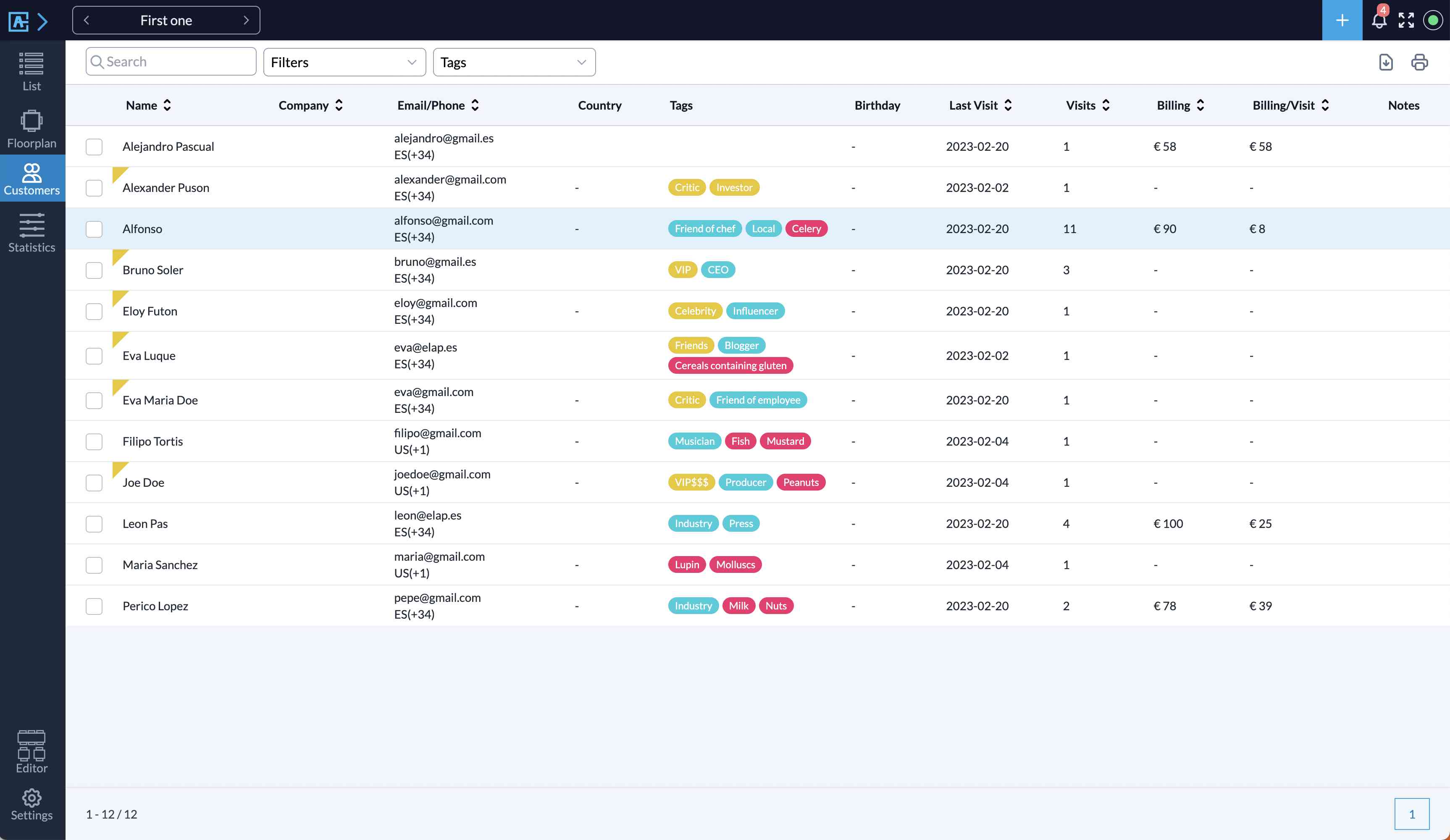
Customers List View — Easy CRM solution for customers. Filter them by tags, last reservation or number of reservations.
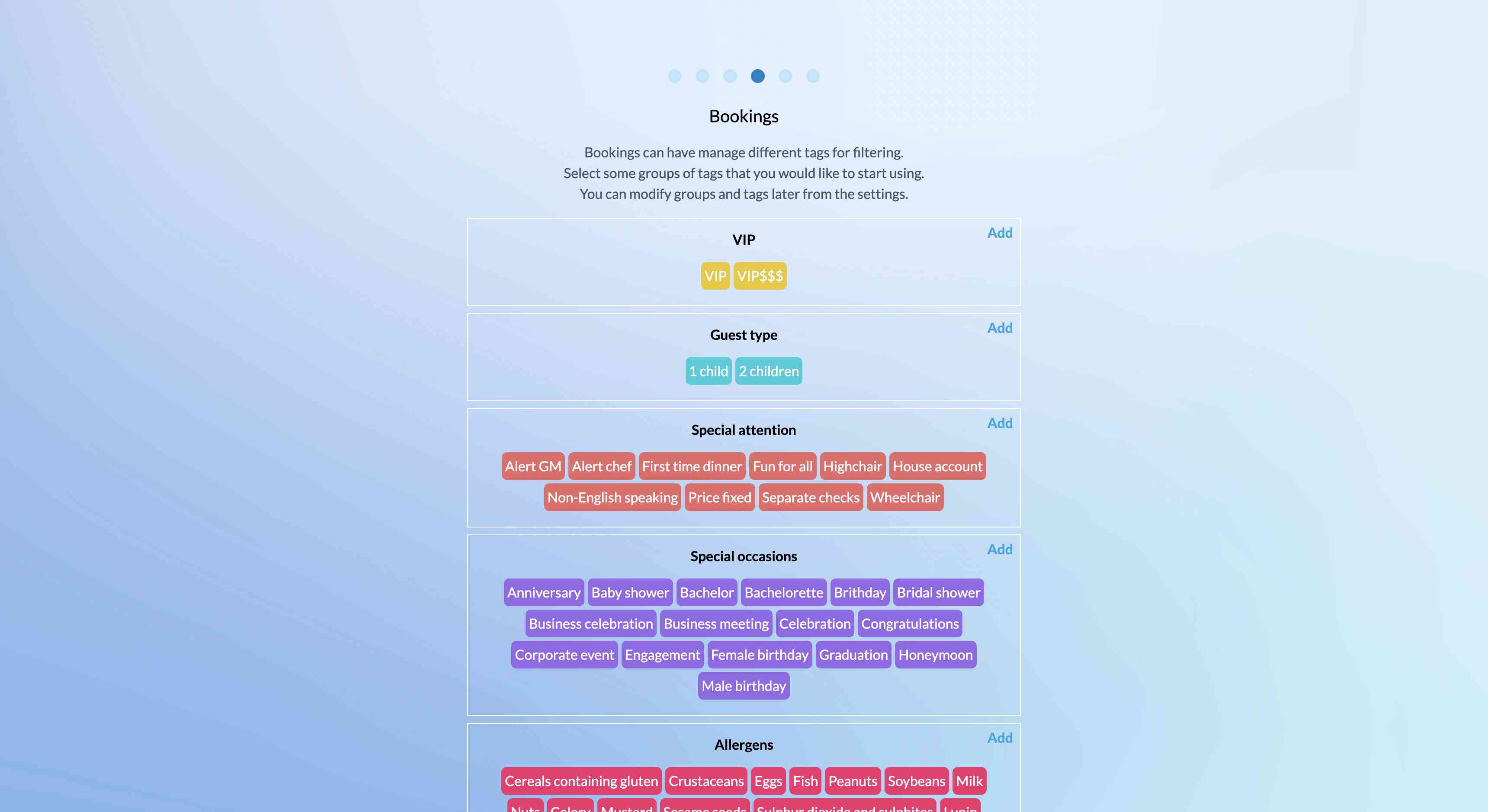
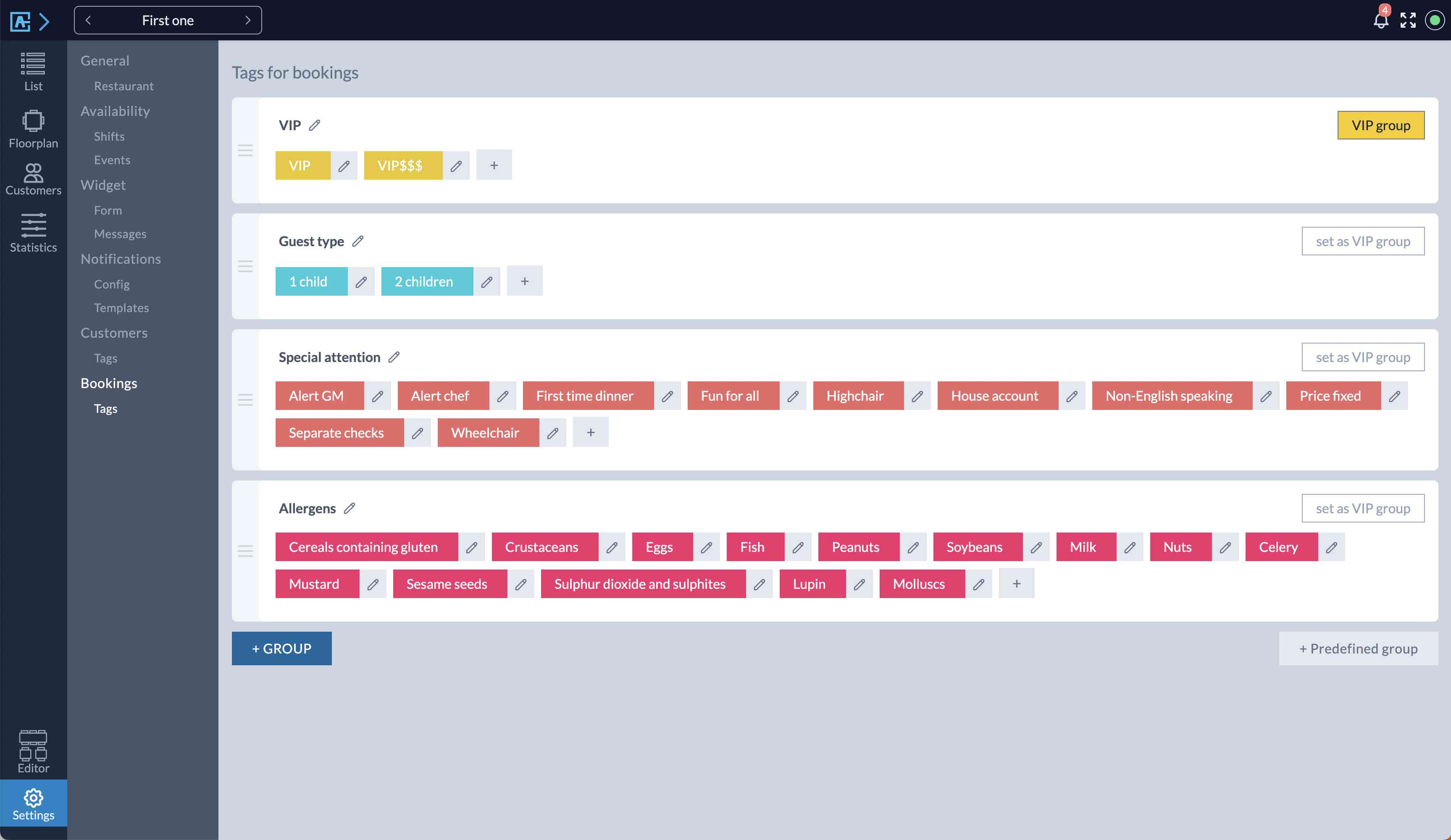
Custom Tags — Create tags for managing bookings and use them for filtering. Tag customers to know their wine preferences, identify VIP customers or know their food alergies.
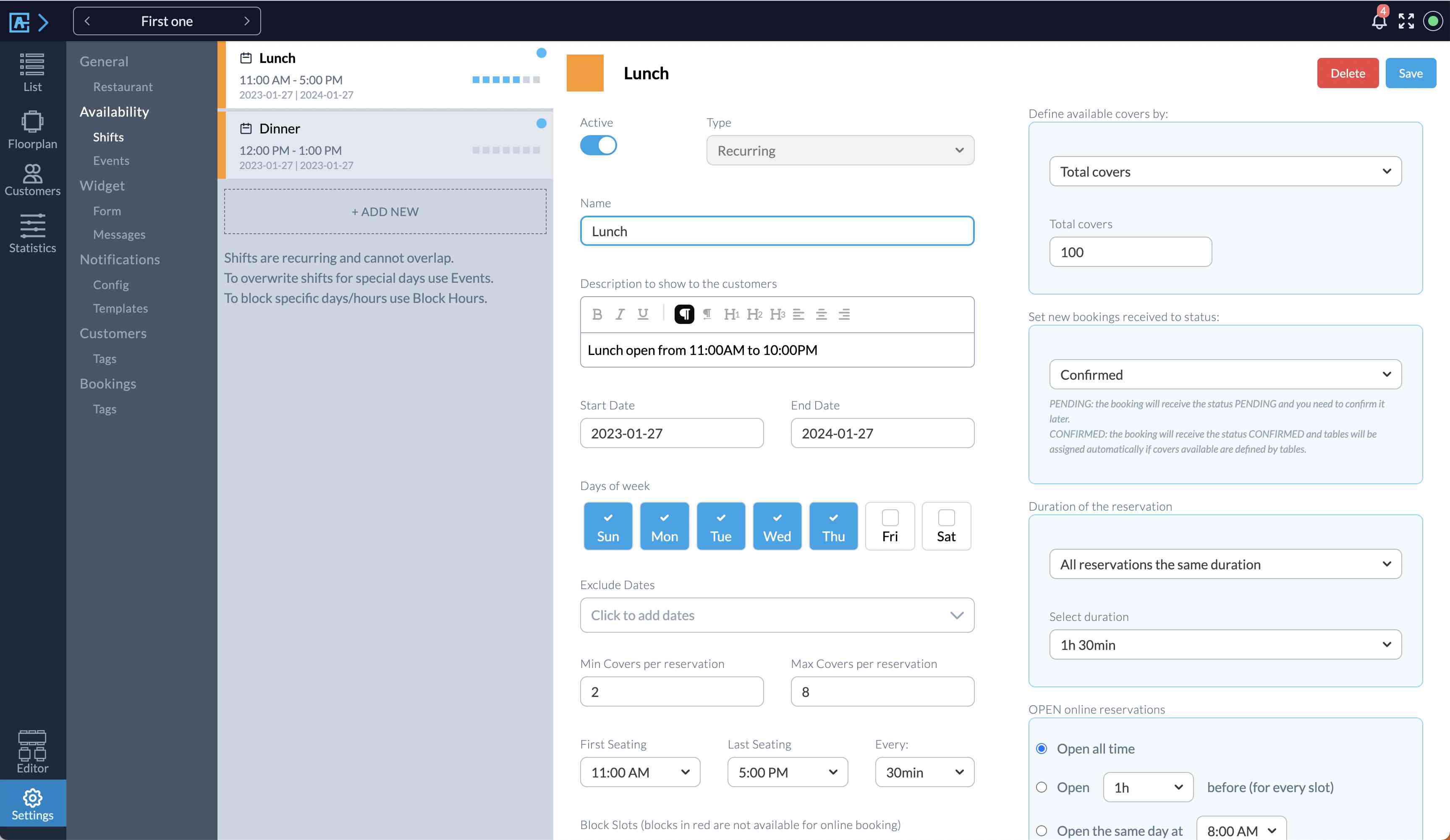
Manage Shifts — Create multiple shifts for breakfast, lunch or dinner.
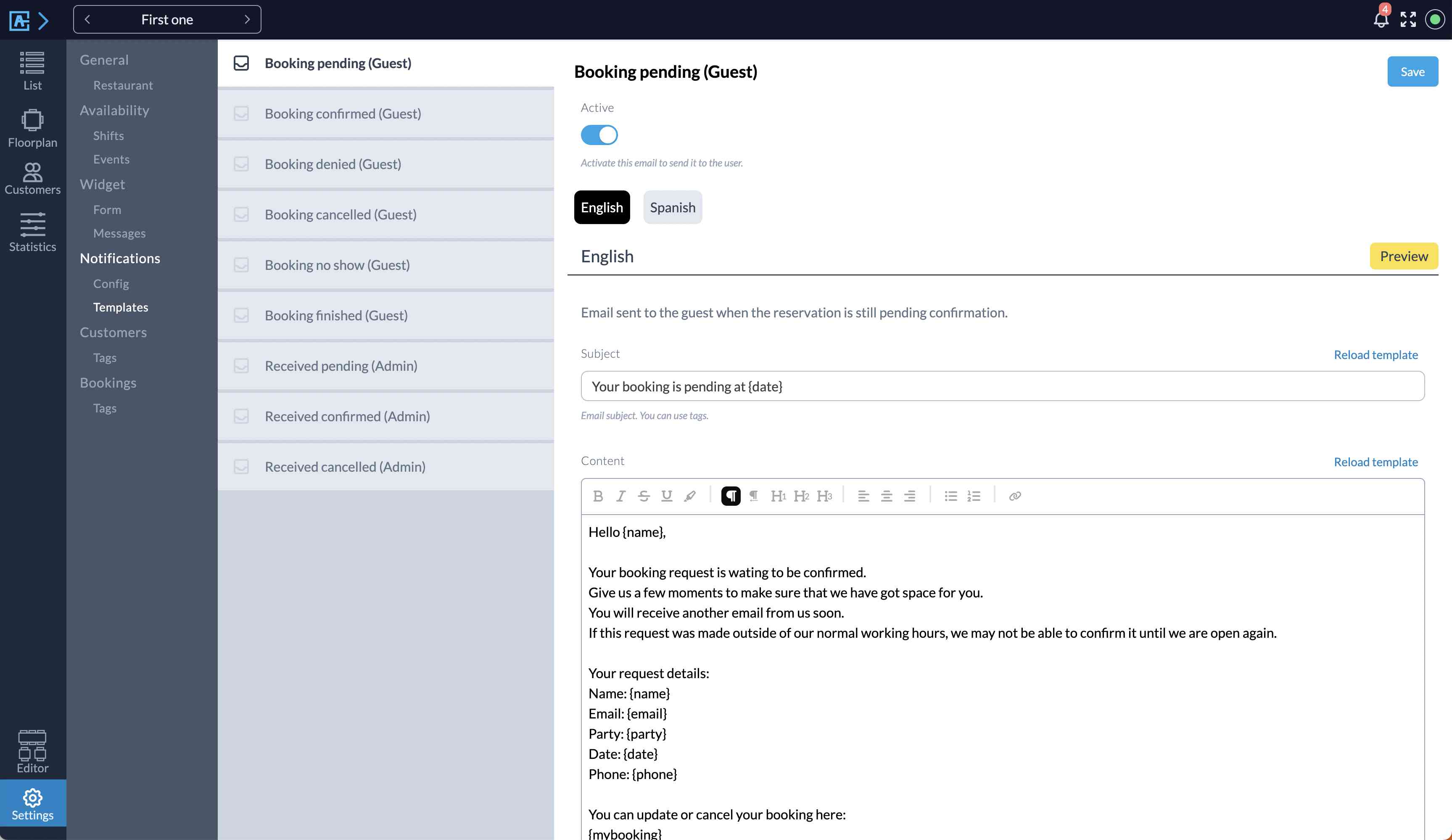
Email Templates — Customer your notifications to customers.
Custom Widget — Multi language front widget. Mobile friendly. Customize colors and the input fields required to the customer.
Features included with the Alex Reservations PLUS Edition for restaurant reservations:
Unlimited Bookings – Receive and manage unlimited reservations across all your venues.
Multiple Restaurants — Centralized management with custom dashboards for each restaurant.
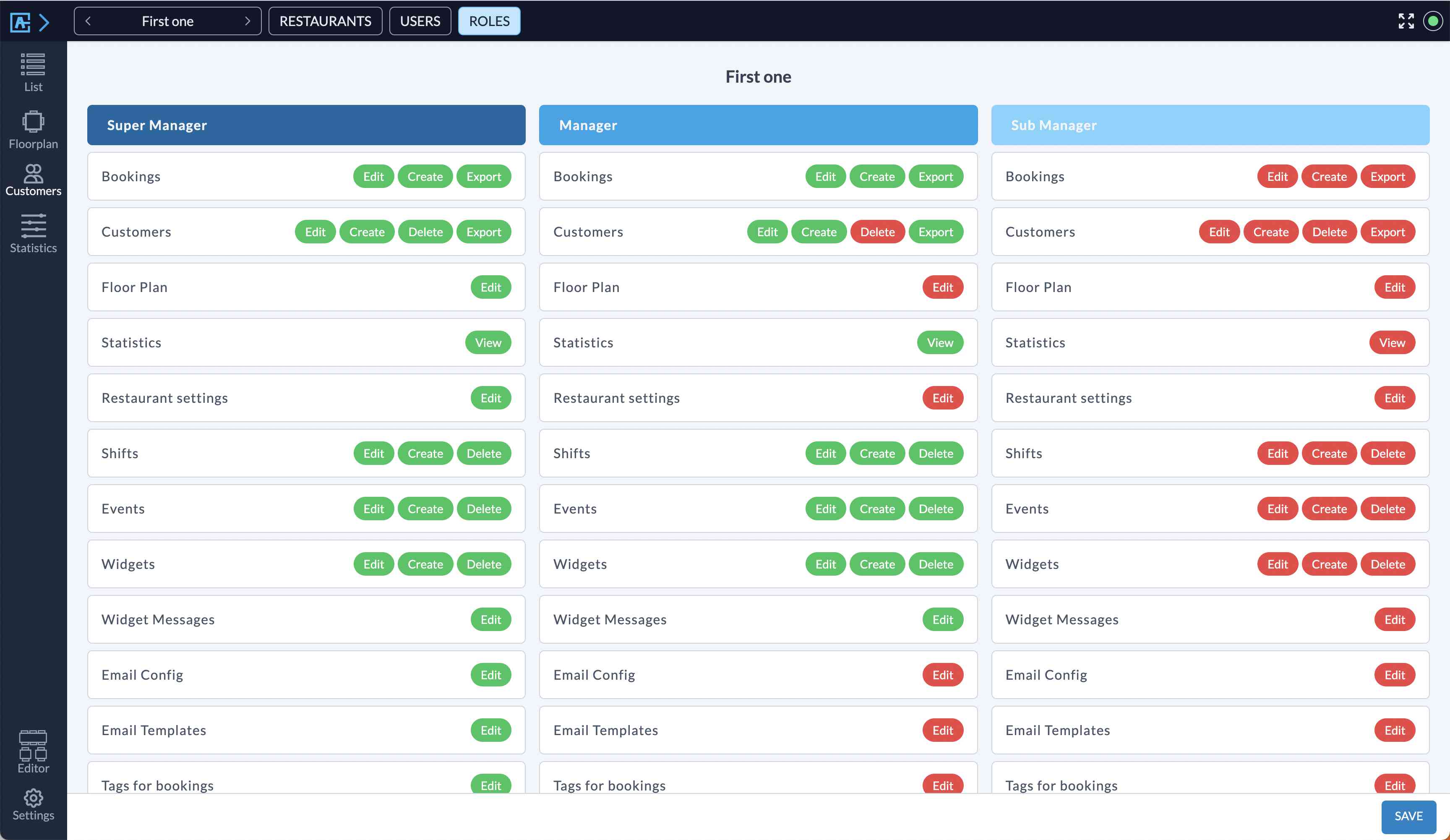
User Roles & Multiple Users — Granular access control with different permissions for each user across restaurants.
Mobile Interface – Responsive design for managing bookings and customers on-the-go.
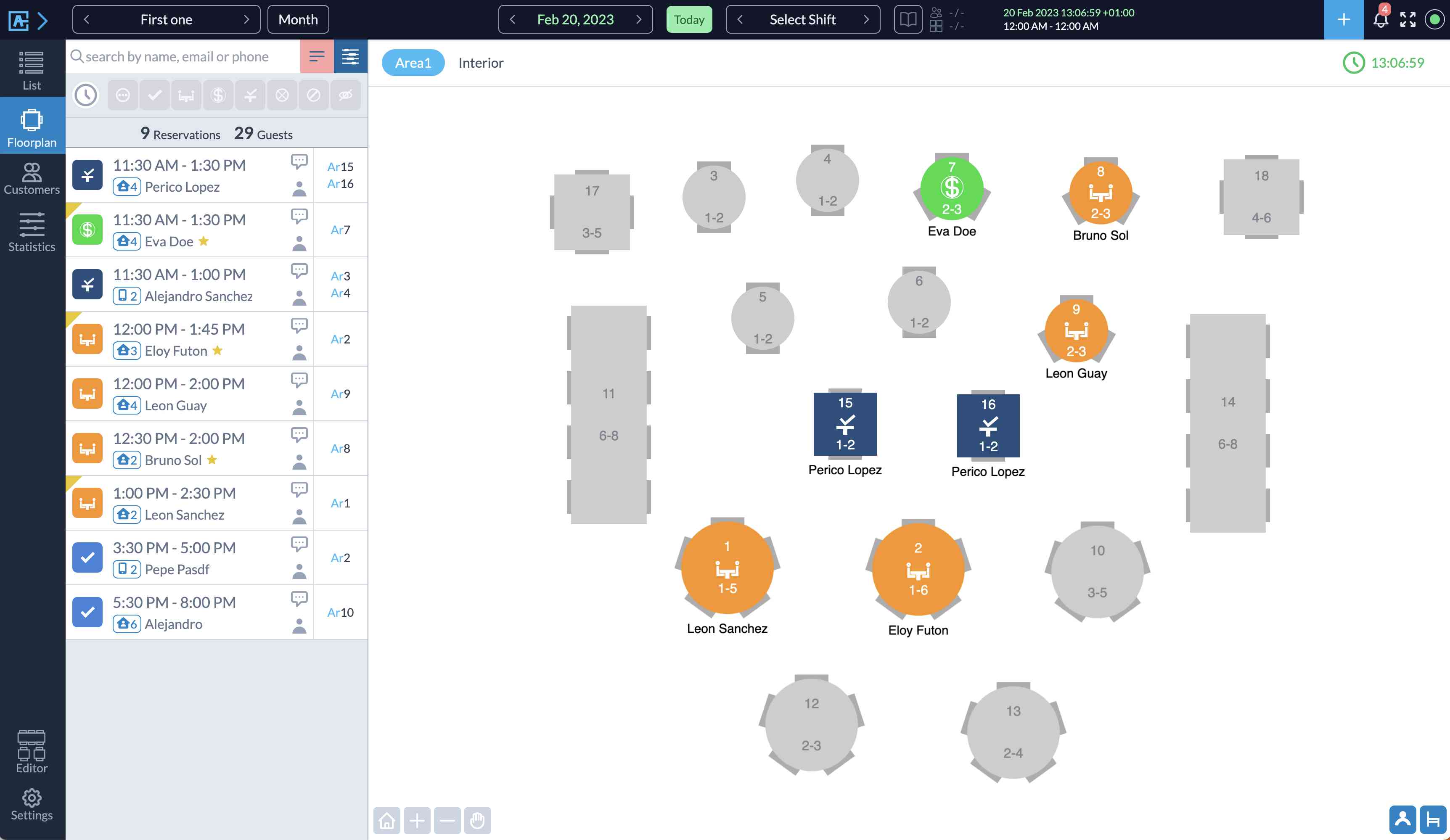
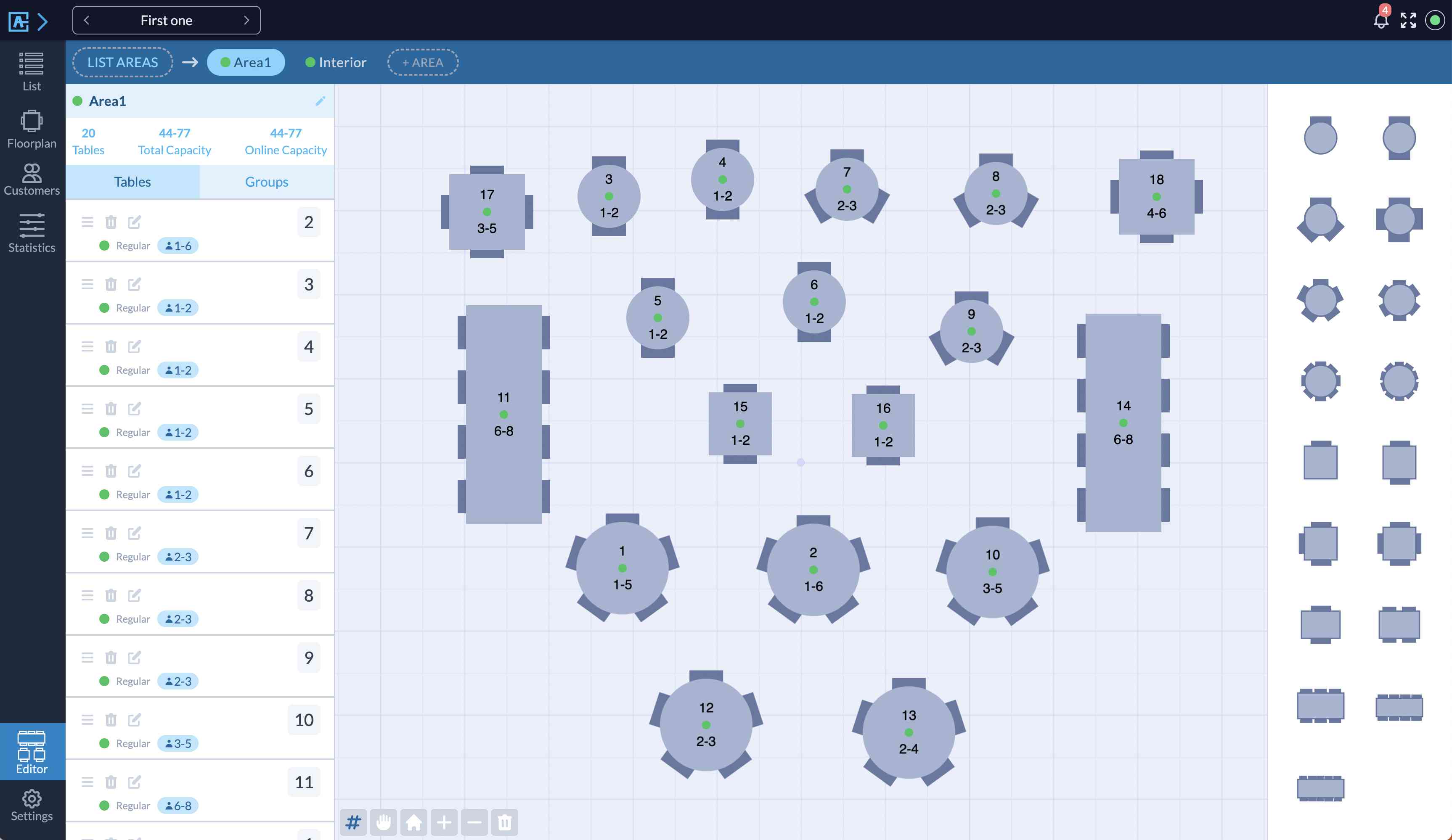
Floor Plan View — Intuitive visual management of tables, reservations, and wait lists.
Tables Editor — Powerful drag-and-drop floor plan builder to create and customize restaurant layouts.
Print your floor plan per shifts – Generate shift-specific floor plans for staff guidance.
360 Panorama Reservation – Immersive 360-degree views for customers to choose their preferred seating.
Timeline Views
Horizontal Timeline – Clear overview of daily reservations at a glance.
Vertical Timeline – Chronological list view for quick reservation management.
Global Timeline – Comprehensive view of all reservations with assigned tables.
Advanced Reservation Features
Area/Table Selection – Let customers choose their preferred seating.
Manage shared tables – Optimize space with communal seating options.
Close days and slots – Flexible control over availability.
Customer Communication
Email & SMS reminders – Automated booking reminders to reduce no-shows.
Email notifications – Comprehensive system for staff and customer alerts.
Email Logo – Branded emails with custom headers and footers.
Customers Reviews – Automated review requests post-dining.
Payments – Integrated processing with Stripe, PayPal, and more for deposits or full payments.
Manage Events — Create and manage special events like Mother’s Day, Christmas, etc.
Multiple Widgets — Customizable booking widgets for different scenarios.
Reporting & Analytics
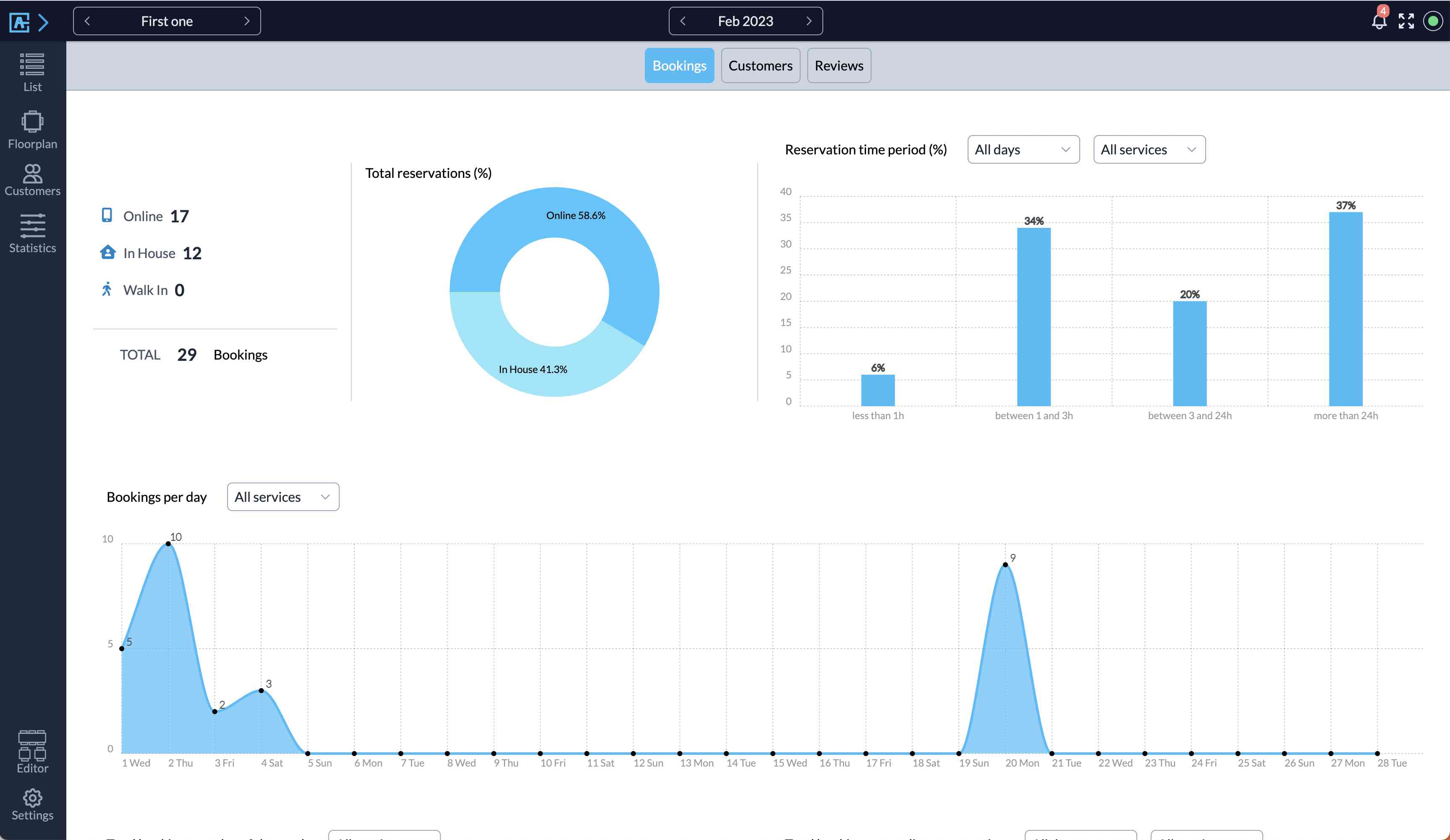
Comprehensive Reports – Insights on bookings, customers, and reviews.
Export Bookings & Customers – Easy data extraction in CSV and PDF formats.
Multilingual Support
Translated to 23 languages – Out-of-the-box support for global clientele.
Custom translations – Fully editable text for perfect localization.
User Experience Enhancements
Dark mode – Modern, eye-friendly interface option.
Getting Started with the Alex Restaurant Reservations plugin is Easy
Use the built-in Setup Wizard to create your first Restaurant in under 5 minutes.
Next, just embed the reservations widget on your site using the widget shortcode [rr_form id='__' button='Book now'].
VIDEO
Who This Reservation System is For
Single restaurants — Restaurant owners can use this system for managing their reservations and tables.
Multiple restaurants — Manage from one dashboard several locations.
WordPress agencies — Create your own SAAS platform for reservations managing many restaurants.
Screenshots
The Restaurants Dashboard When You First Open The Plugin. The Setup Wizard.
List Of Daily Bookings.
Floor Plan With Daily Bookings.
Monthly View.
Weekly View.
View With List Of Customers.
Reports View.
Reports View.
Roles Editor View.
Floor Plan Designer.
Settings. View For Editing Schedulers.
Settings. Email Templates.
Settings. Tags For Bookings.
Front Reservation Form.
FAQ
How do I show the reservations form?
Embed the shortcode of the widget on your WordPress pages or posts. You can paste the shortcode from the widget editor. Settings > Widget > Form.
Where can I read the documentation?
The full documentation is available at our website .
How are bookings assigned?
The system will manage bookings depending on the seats available for every shift. The scheduler can manage seats in 4 ways:
Total seats
Seats for each slot
From all available seats
From specific tables
Can I manage events?
Yes, apart from the usual shifts, specific events can be scheduled.
Can I manage multiple restaurants?
With the free version you can manage 1 restaurants.
With the PRO version you can manage many restaurants.
Can each restaurant manage its own dashboard?
Yes, each one has its own dashboard with all the views.
Do I need a WordPress multisite?
You don’t need to use a multisite WP environment. Each restaurant has its own dashboard and they don’t need to access the WP admin dashboard.
Use a WP multisite if you want to manage subdomains with several pages for each restaurant:
/madrid.myrestaurants.com
/london.myrestaurants.com
/chicago.myrestaurants.com
Use a WP single site if you don’t need to manage subdomains and you can manage regular WP pages:
/myrestaurants.com/madrid
/myrestaurants.com/london
/myrestaurants.com/chicago
Can I define different roles for the restaurant?
Yes, you can manage three different roles, each one can have different permissions: Super-manager, Manager and Sub-Manager.
Does it provide a custom login page?
The PRO version has a custom login page that can be used for accessing the restaurant dashboard without going to the WP admin dashboard.

ChangeLog
2.3.8
Timeline views: highlight top and left bars on reservation hover
Timeline (horizontal view): added a fixed top timeline bar and a new option to reduce row height
Timeline views: added table swap when dragging one booking onto another
Added client’s booking link to the booking popup window
Added new options to enqueue Google Tag and Facebook Pixel scripts on the reservation form page
Saving a reservation from the popup will also trigger the WhatsApp message
Enhanced the popup to send status change notifications across all channels (email, SMS, WhatsApp)
Added widget to detect Twilio balance
Added CSV export functionality to the UTM tracking page
Fixed issue with the Total of Bookings in the Monthly View
Fixed issue when submitting reservation notes with emoticons
2.3.7
Added new options to limit the number of reservations per slot
Added custom messages for Whatsapp
Updated the review notification in the dashboard to take up less space
Added custom fields displayed in the sidebar of the floorplan
Added a notes button to each day cell in the monthly view
Added option to enable visible scrollbars in some views
Tables are now ordered by name in timeline views
New API for checking the status of a reservation
New API for cancelling a reservation created using the API
Added a new hook to handle redirect after logout
2.3.6
Introduced advanced modules with a new modules management view
Improved date selector in list view to include weekdays
Fixed an issue in the floor plan when the time slider is set manually
Fixed an issue in the floor plan after midnight that caused bookings from the next day to be displayed
Fixed an issue with the warning message in the floor view
Fixed an issue with arsource and UTM tracking
2.3.4
Added API to create bookings from other platforms
2.3.3
Fixed issue with email automation
2.3.2
Added no-show statistics
Added customer tags field when creating a new booking
Added 2 new languages: Catalan and Slovak
Added new tag {day} for emails and sms templates
Added new field Birthday to the reservation form
Fixed an issue with the receipt link in the email template
Fixed an issue with the payment method label translation in the reservation form
Fixed issue in customer reports
2.3.1
Added new Google Tag Manager event: reserve_visit, reserve_init, reserve_complete
Added Facebook Pixel event tracking
Added CSV export option in the Bookings report
Added translations for Booking Tags
2.3.0
Added new tables options to the floor plan editor
Added drag and drop to the floor plan editor to change the shape of the table
Added option to set a date in the calendar as FULL instead of closed
Added new scheduling options for automatic feedback emails: 15, 30, and 45 minutes
Added new currencies
Fixed issue when showing the tag ‘Day closed’ in the reservation editor
Fixed issue with Upayments gateway integration
Fixed issue with iframe when embedding form in other websites
Fixed issue with editing Table Tags
2.2.8
Added new option to prevent access wp-admin for non-administrators users
2.2.7
Added Upayments gateway integration
Fixed small issue with WooCommerce Gift Voucher plugin integration
2.2.6
Modified woocommerce integration to use a product ID instead of a fee in checkout
Fixed small issue with reservation form style
2.2.5
Added WooCommerce integration
Added new parameters to the webhooks and Google tags events
Improved functionality to import customers from other platforms
Modified mobile interface to display number of reservations per status
Added Kuwaiti Dinar currency
Fixed issue with WP-Cron job sending duplicated SMS reminders
2.2.4
Added warning message if tables are not assigned to the booking
Fixed issue when uploading image files
2.2.3
Added UTM tracking for campaigns
Fixed issue when pressing ‘Create and Notify’ reservation without email
2.2.2
Added automation to send reminders for pending payment reservations
Added automation to automatically cancel unpaid reservations
Added automation to auto-finish seated reservations
Added automation to auto-mark reservations as no-show
Added automation to request feedback when reservations are finished
2.2.1
Added new reservation mode -Tables with custom prices-
Added new reservation mode -Tables with custom schedules-
Added custom class to calendar dates in the reservation form
Fixed issue with cron job not running
2.1.9
Added customer’s email as ‘reply-to’ in all admin email notifications
Added new SMS templates to notify the administrator when a new booking is made
Added phone to webhooks and GoogleTag
Prevent close reservation popup when clicked outside
Fixed issue with reservation form layout
Fixed issue with scheduler actions
Fixed issue when saving/charging card number in Stripe
2.1.8
Integrated Bulkgate as an SMS gateway
Added support for Xendit as a payment gateway
Updated monthly view to include a ‘No-Show’ bookings button
Added new settings to customize PWA name and description
2.1.7
Fixed calendar date availability calculation to ensure accurate initial date navigation
2.1.6
Resolved an issue where the calendar in the reservation form was not correctly filtering available days
2.1.5
Fixed issue with widget calendar when using the option ‘show services selector’
2.1.4
Improved booking engine performance for a faster reservation form experience
Added option to control pacing of covers per time slot in table reservation mode
Added Indonesian language and new currencies
Fixed styling issue with the service selector on the reservation form
2.1.3
New function to import bookings from other platforms
Fixed issue when filtering customers
‘Respond to Review’ popup -> display table number
Added new tables to the floor plan: bar counter, high table, booth table
2.1.1
When the customer modifies their booking, the form now displays the current booking data
Adjusted the CSS styling of the reservation form to prevent it from affecting the WordPress theme style
Fixed an issue with the notifications popup
2.1.0
Added a limit to the number of times a reservation can be modified
Added new style to notifications to identify better new, modified, cancelled and confirmed bookings.
2.0.9
New: added button to respond to the customer’s feedback
New: list of reviews can be exported to CSV
New: list of reviews can be printed
Addon: reservation mode with custom schedule for each table
Added number of guests to the floor plan when printed
Some adjustments in the reservation form
2.0.7
New: added non-blocking tables mode when reserving
New: combinations of tables are now considered when selecting an area or table
New: allow long email extensions in the reservation form (.online)
New: added new tags for emails: {first_name}, {last_name}
New: added auto-scroll to the message upon successful reservation
New: added light/dark mode to the user’s profile
New status rule -> Reservations made X hours before the time slot will be marked as Pending
New modal to add booking tags from the floorplan view
Fixed an issue where modifying a booking did not assign a new table based on the updated number of guests
Fixed issue when the settings ‘from time’ and ‘to time’ (reconfirm) are null in the shift
Fixed issue with restaurant logo field not displayed (used for booking view)
2.0.6
New: Opening window settings (from specific time to time) to allow clients to reconfirm bookings.
New: Shifts and events now allow the selection of specific tables for each weekday
New: Each user can select a different language for their dashboard, independent of the restaurant’s default language
New: The customer’s list of bookings now also includes Cancelled, Denied, and No-show bookings
Fixed issue with shortcode: sanitized all provided attributes to prevent potential Cross-Site Scripting (XSS) vulnerabilities
2.0.5
Enhanced the reservation form to handle parallel server requests more efficiently.
Resolved an issue in the calendar view where bookings failed to load when transitioning from December to January.
2.0.4
New widget setting added to allow disabling the display of alternative dates.
2.0.3
Fixed issue with timezone in the reservation form with alternative dates###2.0.2 ###
NEW: Detect if customer emails have been opened
NEW: Added a “Cancel Reason” field to the popup displayed when a user cancels a booking.
NEW: You can now add custom CSS to the dashboard
NEW: Setting to display time slots as a dropdown instead of buttons
NEW: Added new email tag {area_table_assigned} to show the area and table assigned to the customer
Pending Bookings View: Now supports auto-refresh, updating every few seconds to ensure real-time accuracy.
Floor View: When switched to another area, the view will automatically adjust
Fixed issue where table changes made by customers (modify booking) were not being recorded in the booking history.
Fixed issue with displaying client booking history.
Fixed issue where tables changes from the ‘edit booking’ view were not being recorded.
2.0.1
NEW: Users will be redirected to Google Reviews when they rate more than X stars
NEW: Enhanced customer tag rules – bookings can now be set to ‘Denied’ or ‘Pending’ based on customer tags.
NEW: Added permission to control access to the pending bookings list
NEW: Added a new setting to disable the popup when marking a status as ‘Finished’
NEW: Added a setting to automatically fill in the reservation form with user data when logged in.
Fixed issue not counting bookings with status ‘Seated’ in the reports
Fixed issue with ‘Other available dates’ styling
Fixed issue with rule for pending bookings
Fixed issue with message ‘This user has no restaurant assigned’
2.0.0
NEW: Introduced recurring bookings feature
Added search functionality by booking ID in list view, floor plan view, and calendar view
Mobile: Added search by booking ID, email, and phone
Mobile: Bookings can now be edited directly from the customer list view
Introduced custom webhooks for sending notifications from the reservation form
Fixed a bug where creating a new customer would fail if the customer existed in a different restaurant
Booking creation date is now properly formatted according to the restaurant’s timezone
Corrected total calculations in the monthly view
Corrected total calculations in the reports
1.9.9
NEW. When no dates are available, the system will suggest alternative dates to the customer
NEW. When defining 0 days in Stripe for pre-authorization will use card-on-file only
NEW. Added ‘noindex’ to the dashboard page prevent indexing by search engines
Changed pre-authorization to new Stripe API
Fixed bug when testing Stripe sandbox with card-on-file
Pre-auth payment: fixed bug button not displayed after warning message
1.9.8
Stripe updated to the new version API
Added Stripe pre-authorization method
Setting to define pre-authorization number of days
Added new email tag {area_table} to show the area and table selected by the user when reserving
Added area/table selected to the customer’s booking view
1.9.6
New list view for all Pending reservations
New setting for Shifts to define different working hours for every day of the week
Added desktop scroll with mouse (left click + move) to the customers view & bookings list view
Added new setting to SMTP to send emails directly using phpMailer instead of WP mail function
Added warning message when the user has no restaurant assigned
Fixed issue when hovering mouse on rotated tables
1.9.5
When a customer cancels a reservation will receive an email
Floor plan view can display any shift with bookings for printing
When creating a reservation from the floor plan view will use the date selected in the view
View number of visits/no-show of the customer selected when creating a reservation
1.9.4
Reservation popup can be changed to the left side to view the full floor plan
New settings section ‘Dashboard’
New setting for expiring time when using the floor plan time slider manually
New setting to require the user to select the area before finishing reservation
New filter for new notifications: pending / confirmed
Create reservation popup: added user icon to edit customer
Fixed issue when status change not showing popup to send email
1.9.3
Added blinking + icon to bookings without tables attached
Fixed issue with initial wizard
Fixed issue with listing booking emails
1.9.2
New in timeline views for desktop: allow Drag & Drop to move reservations
New in timeline views for desktop: mouse left click + drag horizontally to scroll
New occupancy chart
New mobile interface with floorplan and timeline views
New pinch-zoom gestures in floorplan for touch devices
Floorplan: added mouse-wheel zoom
Google Tag Manager: added events: reserve_init, reserve_complete
Reservation widget: added setting for custom CSS
New SAAS settings
Fixed issue when importing customers tags
Fixed issue with Stripe sandbox
Fixed issue in widget when selecting event for a previous date###1.9.1 ###
Added SGD currency
Fixed issue with walkin popup not assigning tables###1.9.0 ###
Revervation popup: metric added with new covers booked during the interval
Line time slider will not reset automatically, has to be resetted manually
Added new tag {service} for admin emails
Added shareable tables to attach seats manually to the booking
Fixed issue with reservation popup###1.8.8 ###
Added new setting ‘Max new covers’ in the ‘Covers per slot’ mode
Added private booking tags, which are excluded from the emails sent to customers
Added setting to require phone field for new bookings
Added settings to enabled/disable tabs in the booking editor
Added a history log of actions for bookings
Line time removed from past days in floor view
Fixed issue with included dates for shifts when adding manual reservations
Fixed issue in Firefox – reservation form
Fixed issue widget popup not loading in third party domain
1.8.6
New: added drag & drop interface for tablets
Fixed issue when saving tables assigned
New setting to edit booking interface (multiple tabs or scroll)
Fixed small issue when activating the plugin
Fixed issue with timeline scroll
1.8.4
New: added authentication codes to remember user for 1 year
New: added drag & drop interface to attach tables to booking in the floorplan view
New payment description for Mollie gateway
Added fields name, email to walkin form
Simplified popup interface to create/modify reservation
Fixed issue with the option to prevent double bookings in tables
Fixed issue: user reconfirm button only visible if enabled
Fixed issue with Stripe when WooCommerce Stripe plugin is active
Fixed issue when filtering shifts in floor plan view
1.8.3
New: simple form to create reservation without tabs
New: toggle buttons to close a full month
New: added new shift option to prevent double reservations for tables
New: SAAS redirect login page to custom link
New: added new column ‘Created’ to the list of bookings
Changed icon table in the reservation editor
Fixed customer language assigned from the first booking
Fixed translation for ‘My Booking’ button in the email
1.8.2
New: email layout added buttons and logos
New: email layout can customize link and button colors
New: send email/SMS notifications when payment is done during reservation
New: added new field ‘Include Dates’ to shifts
1.8.1
Fixed issue assigning tables automatically for shifts with specific tables
Fixed issue with duplicate bookings when using 2 forms and same shifts
Customers can book multiple shifts on the same date, but cannot book the same shift more than once
1.7.9
Fixed issue when saving tags from reservation form
1.7.8
Fixed issue when creating booking manually
1.7.7
New: Tables can be blocked for a booking
New: Emails can use a logo url instead of uploading an image
Added new email tags: {restaurant_link} {restaurant_facebook} {restaurant_instagram}
Added online help in the dashboard
1.7.6
Improved functionality for importing customers from CSV file
1.7.5
New: Shift/Event name and description can be used in multiple languages
New: new tag for emails {end_time}
New: show/hide reservation duration can be customized per shift/event
New: widget messages can be customized per shift/event
New: not available slots can be shown in the widget
Adjustments in the reservation form for mobile screens
Fixed issue with rules ‘pending’ for shifts
1.7.4
New: Groups of tables can be blocked on specific days
New: Groups of tables with some tables blocked will be blocked too
Added permissions for email templates and reminders
Added permissions for SMS reminders
New rule for pending status: select specific days as pending
New rule for pending status: select specific tables as pending
Fixed issue when auto-selecting first date available in the widget
1.7.3
New view to block tables for specific dates and times
Responsive layout for tablet (list view and floor view)
Floor view with floating sidebar
Added tables to customer’s bookings list
Fixed issue with sliders in Mozilla
Fixed issue with custom email textarea editor
Fixed issue with Stripe sandbox check field
Fixed issue with tables for events
1.7.1
Fixed issue with custom emails format
1.7.0
New bookings with empty email will generate random email
Modified interface when associating customer to new booking
New feature: create custom emails for customers
1.6.9
Added new objects to the floor plan builder
Fixed booking language issue when updated
Added custom links for social channels tracking
1.6.8
New booking status: User Reconfirmed
New reconfirm funcionality
New Confirmed/Pending rules for shifts/events
Reservation form autofill user details from previous booking
Added column for Booking/Customer language
Added booking private notes
Bookings CSV/print use columns from the list view
When creating booking duration is updated depending on shift selected
Removed red statuses from floorplan and timeline views
1.6.7
Fixed header in timeline views
1.6.6
Implemented a logging system to capture all database actions
Added new Dark Mode
New permissions: Email reminders, Sms templates, Sms reminders
Floor plan view: added timeline slider
1.6.4
Added internal messages for staff for daily bookings
Email and SMS Reminders up to 30 days
Closed days are displayed in the top bar calendar
Closed days displayed in the ‘Add new booking’ popup calendar
Fixed email reminders templates
Fixed issue with form for Google Reserve
1.6.3
New engine for reserving single tables and groups
Shifts and Events are now sortable
The display of available time slots is organized according to the sorted shifts and events
Fixed issue when deleting area and not deleting tables
Fixed issue with view booking page
1.6.2
Fixed issue with payments
1.6.0
Timeline view: added filter by areas
New: Utilize Stripe to securely store card details without initiating a charge
And bill your customer in case of a no-show
1.5.7
New payment gateways: Paypal, Redsys, Square, Mollie, Mercadopago
Floor plan view can hide sidebar
1.5.6
New timeline view: tables in columns
Minor UI changes
1.5.5
New Pin-Code for users
Quick mode to create Walk-in bookings
Timeline view -> click table or time to create booking
Floor view -> click table to create booking
1.5.4
New mobile interface
Allow overlapped shifts
Assign tables when using overlapping shifts
New permission for managers: show WP back button
1.5.3
Fixed issue with timezone in notifications time displayed
Fixed issue with reservation process > 10 min
1.5.2
Added 3D reservations to the reservation widget
Added new intervals for first-seating/last-seating
1.5.1
Fixed issue with 360 panoramas
1.5.0
Added creator for 360 panoramas tour
1.4.9
New email template for modified reservations
For admin email notifications the restaurant email is used by default
Fixed issue with double notifications for administrators
1.4.8
Added new settings for area/table reservations
Areas highlighted in red indicate that no tables/seats are available
Fixed issue when loading booking view for customer
1.4.7
Highlight area selected in the reservation form
Jump to next step automatically after selecting area/table
New setting to show/hide areas images when reserving
New setting to show/hide areas free seats when reserving
New permissions for ‘Close days’ and ‘Close slots’
1.4.6
Improved floor plan buttons to zoom
1.4.5
Customer can select Area/Table from the reservation widget
1.4.4
Compatible with Elementor builder
Compatible with Beaver builder
Compatible with Divi builder
1.4.3
New widget for external domains
Fixed issue with login – magic code
1.4.2
1.4.1
Google Reserve (Beta)
Added custom class to each field in the widget form to help styling
Styled checkboxes in the reservation form
Fixed issue with email logo for Android
Email logo is now stored in the uploads folder
1.4.0
Admin can confirm bookings by email
Added tables to the booking card view
Added intervals every 15 min for durations
Duplicate function for Shifts and Events
Added search bar to the monthly view
Added search bar to the weekly view
Fixed issue with PDF not printing booking time
1.3.9
Added new languages
Added new currencies
Added button ‘Update and notify’ to the reservation popup
Fixed some issues
1.3.8
Custom fields can be displayed only for specific shifts/events
Added custom settings for SAAS solution
Send SMS when creating new reservation from the dashboard
Old bookings selected or pending_payment are not deleted from DB, instead the status is changed to deleted
Fixed issue when changing booking not assigning new tables if required
Updated to PHP 7.4
1.3.7
Added SMS notifications
Added SMS reminders
New field to opt-in for receiving SMS
1.3.6
Added custom fields to the reservation form
Custom fields types: text, textarea, select option, multi option, checkbox
New function for SHifts/Events: set status Confirmed up to X covers, otherwise set as Pending
New columns added to export CSV bookings: time in 12h format, custom fields
Fixed small issue with dates closed
1.3.4
Max days in advance for reservations is now up to 360 days
Fixed issue with custom slots closed
1.3.2
New mobile bookings list view
Added notifications list to the mobile interface
Mobile interface: when changing status will ask for sending email
Fixed issue with the copy shortcode button
Fixed issue with the placeholder field inside the widget settings
Fixed issue with the ‘close days’ function
1.3.1
Added Pre-payments with Stripe
Added buffer time to allow booking cancellations
Added buffer time to allow booking modifications
Added new tag {service} to the email to show the shift/event name
Added default country dial code to the reservation form
Added placeholder to all widget fields
Added new field to widget settings for custom message when no slots available
Added scheduler to remove holded bookings after 10 minutes
Added scheduler to remove pending payment bookings after 2 hours
Email templates translated into Greek
Fixed some translations
Fixed issue when copying the widget shortcode
Fixed issue when loading email templates
1.2.5
Import customers from a CSV file
Top bar adapted for tables
Redirect from WP login to the dashboard
Added Greek language
Auto-sync custom translation with new strings
Fixed style front-end widget
Fixed issue with empty description for shifts
Fixed issue manager deleting shifts
1.2.4
New feature to close specific slots for specific dates
Sidebar menu items can be hidden based on role
Added translations for login page – PLUS
Delete users from the dashboard without removing WP-admin user
Fixed bug in calendar with first day of week
1.2.3
Added email reminders – PLUS
Added pending bookings to calendar view
Fixed issue when filtering available tables
Fixed issue with dashboard notifications
1.2.1
Prevent duplicate bookings setting
Filter available tables when creating booking
Assign tables from the mobile view
New icon to show bookings attached on the floor plan
Fixed bug when creating user with ‘ in the name
1.2.0
Dashboard is now mobile friendly – PLUS
Added new general settings – PLUS
1.1.8
Fixed issue with custom logo upload
1.1.7
Added customization login – PLUS
Added edit columns for bookings – PLUS
Added edit columns for customers – PLUS
1.1.6
Added translation view – PLUS
1.1.5
Fixed issue when managers create booking
1.1.4
Issue with start/end seating labels
1.1.3
Updated tables
PRO: add to calendar
PRO: can modify booking
PRO: can cancel booking
PRO: social links
1.1.2
1.1.1
Core for PRO version
Fixed small bug
1.0.9
1.0.8
Issue sending admin emails
Issue when assigning automatic tables
1.0.7
New setting for time format
1.0.6
1.0.4
1.0.4
Fixed some bugs
Added calendar button
1.0.3
1.0.0