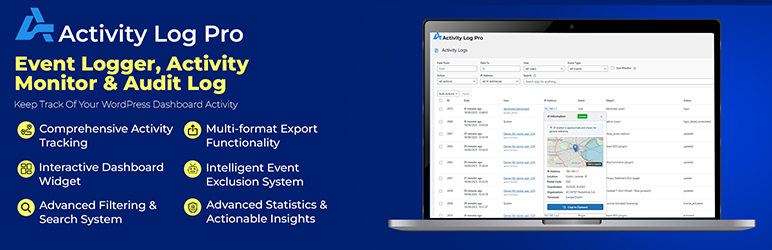
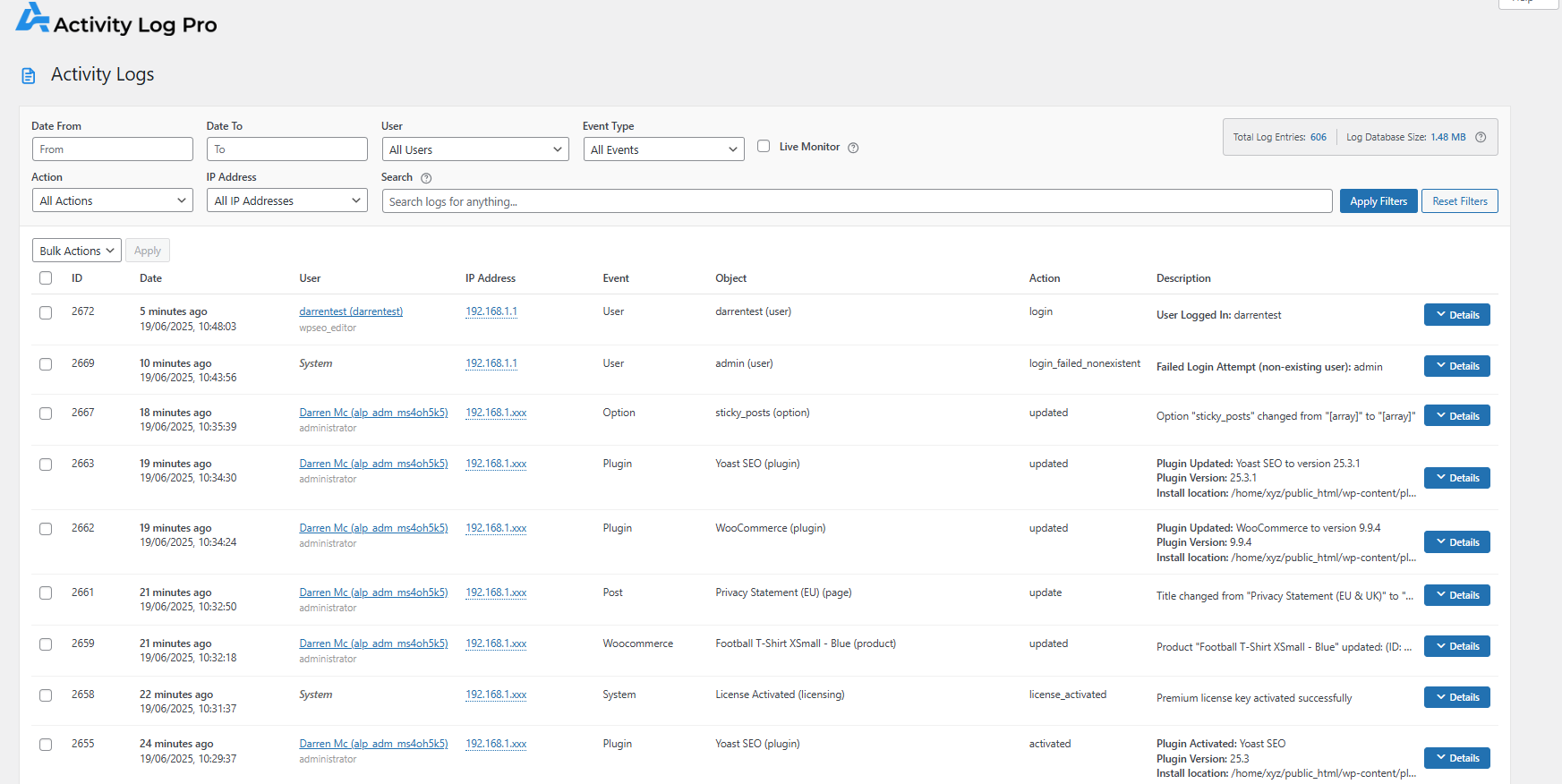
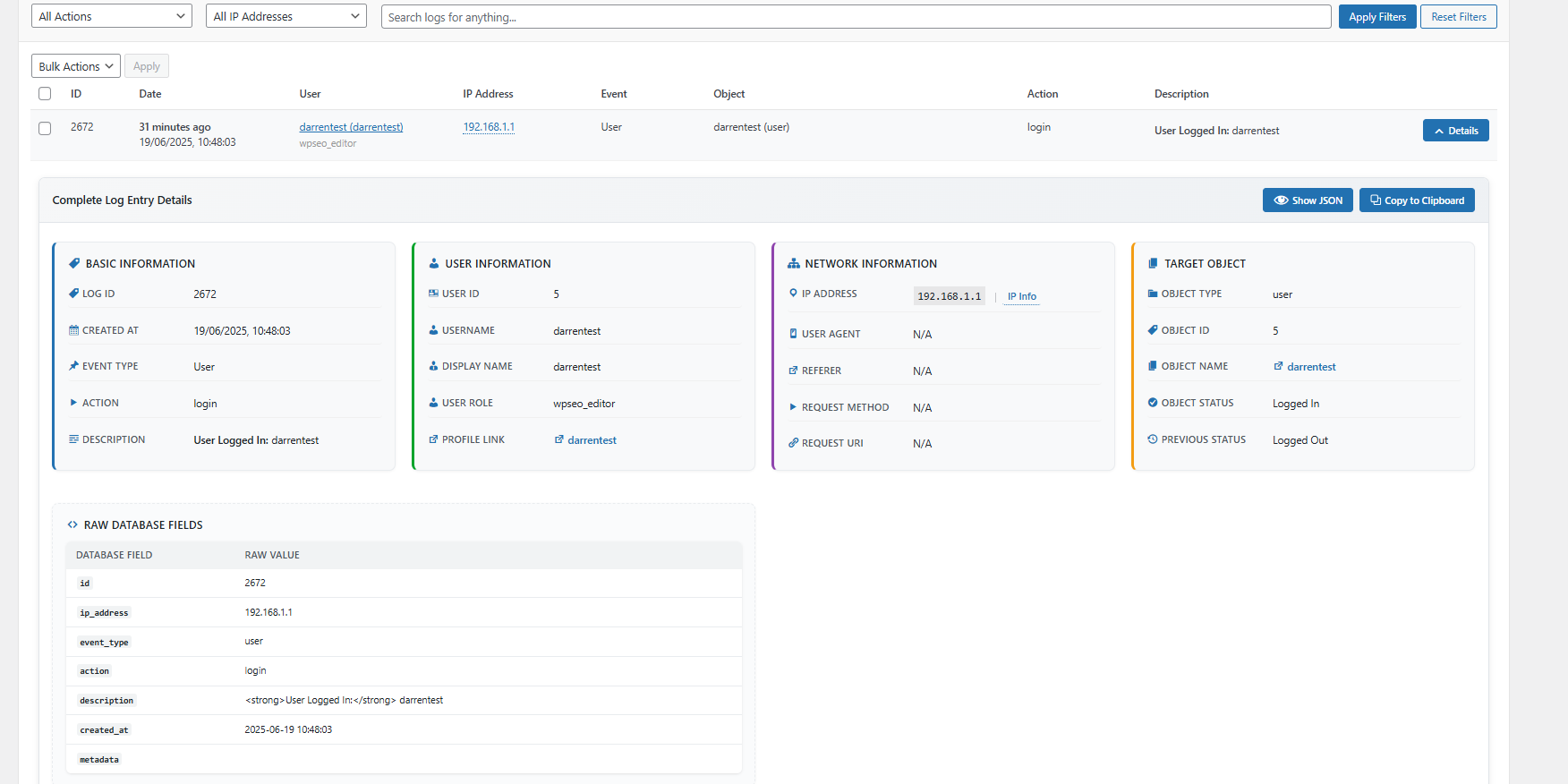
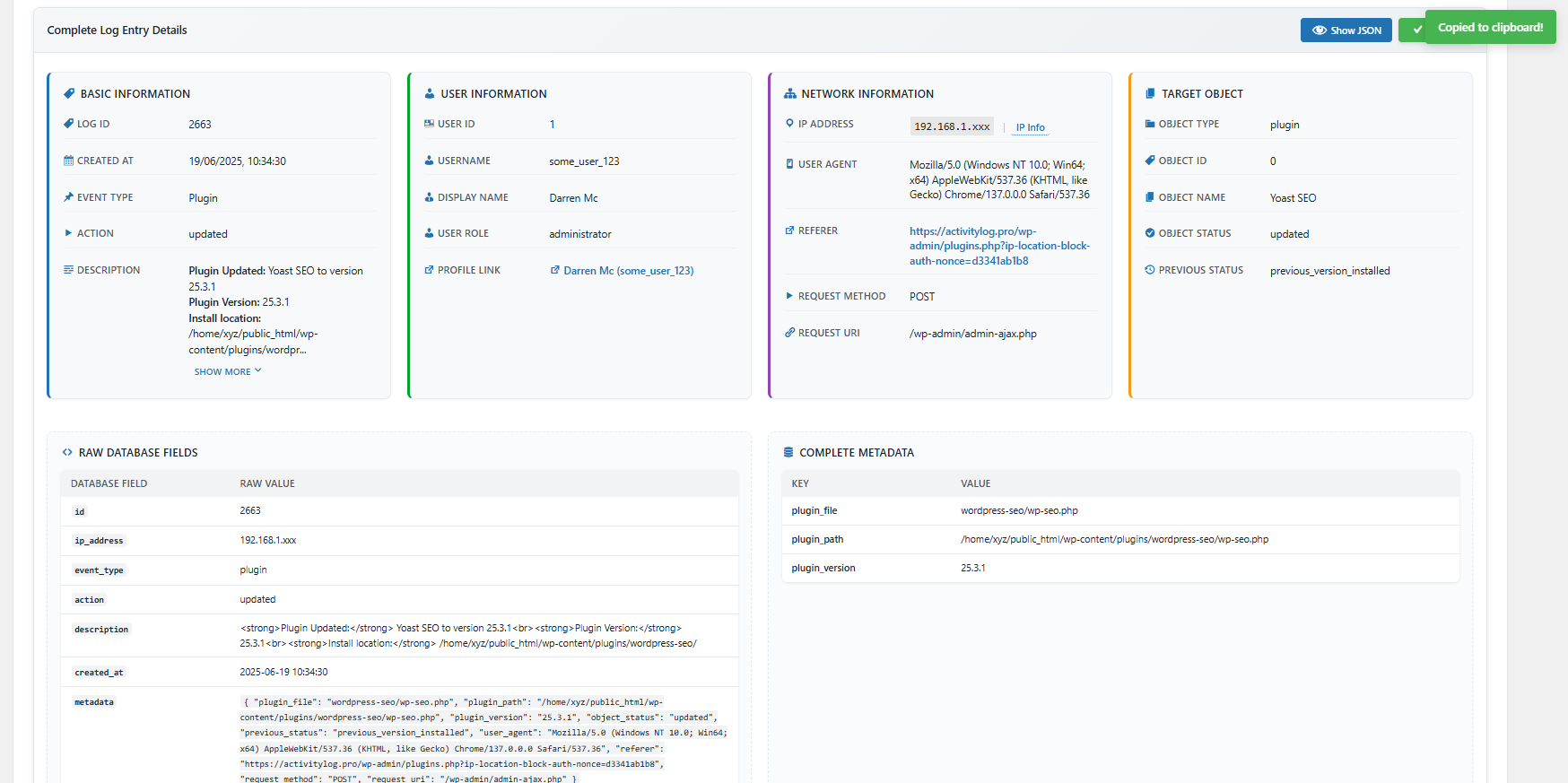
Activity Log Pro is a complete WordPress activity log, user activity log, and audit log plugin for user tracking and accountability. Track user logins, content changes, plugin and theme updates, settings changes, and other important site activity – and see who did what, when, and where from one clean activity dashboard.
Activity Log Pro gives you a complete audit trail of everything happening on your WordPress site. See who logged in, what content changed, exactly when it happened, which plugins were updated and any suspicious activity – all in one place.
Perfect for businesses, e-commerce stores, agencies, WordPress maintenance services, and multi-user sites that need full visibility into user and system changes.
Agencies and freelancers managing multiple sites can use Log Channels (Premium) to centralise logs from every client site into a single logging platform like Datadog or Better Stack.
Whether you’re troubleshooting issues, staying compliant, or monitoring for security threats, Activity Log Pro is your WordPress activity tracker and activity monitoring tool to keep your site secure and transparent.
“This is a super slick plugin guys. Very simple to use, very clean interface. Super excited about it.” – Ryan @ InfluenceWP.com
“Perfect! Robust and exemplary neat plugin! All the info that you need is in a clear overview.” – @mixha
Why Use a WordPress Activity Log?
Understand every action on your site, reduce security risks, and simplify compliance.
Security & Compliance: Stay compliant with GDPR, HIPAA, and other regulations while detecting failed logins, role changes, and suspicious behavior.
Troubleshooting & Debugging: See exactly what changed before something broke – track plugin updates, theme edits, and content changes.
User Accountability & Audit Trails: Know exactly who did what, when, and from which IP address for complete transparency and legal compliance.
Performance & Site Health: Monitor plugin installations, theme changes and modifications that impact your site’s speed and stability.
Enhanced Backup Strategy: Create detailed change logs that complement your backups – know exactly what to restore and when changes occurred.
WordPress Security Monitoring: Track failed logins, suspicious activities, user role changes, and potential security threats in real-time.
Key Features of This WordPress Activity Log Plugin
Complete Core Activity Tracking
User login/logout activities with IP tracking
Failed login attempt monitoring for security
Login Flood Guard (optional) — caps consecutive failed-login log entries during brute-force bursts; configurable threshold (20/50/100/200), on/off toggle, and an inline notice on the Activity Logs screen when suppression is active
Post, page, and custom post type changes (create, update, delete)
Media library activities (upload, edit, delete)
Plugin installations, activations, deactivations, and updates
Theme switches, installations, and customizer changes
WordPress core updates
Widget modifications and placement changes
Menu creation, updates, and deletions
User registration, profile updates, and role changes
Excluded Roles & Users — Exclude entire roles or specific users from activity logging; security events (login, logout, failed login) are always recorded
Advanced Plugin Integrations
WooCommerce Activity Log: Complete e-commerce activity monitoring — track order modifications, product changes, inventory updates, customer data edits, payment gateway settings, and coupon usage for full store audit trails (Premium)
Yoast SEO Activity Log: Monitor all SEO changes including meta descriptions, title tags, search engines follow links, Advanced Meta Robots, Breadcrumbs Title updates, focus keyword changes, and readability optimizations to maintain SEO integrity (Premium)
Free Professional Features
Real-time activity monitoring dashboard
Advanced filtering and search capabilities
Detailed activity metadata and context
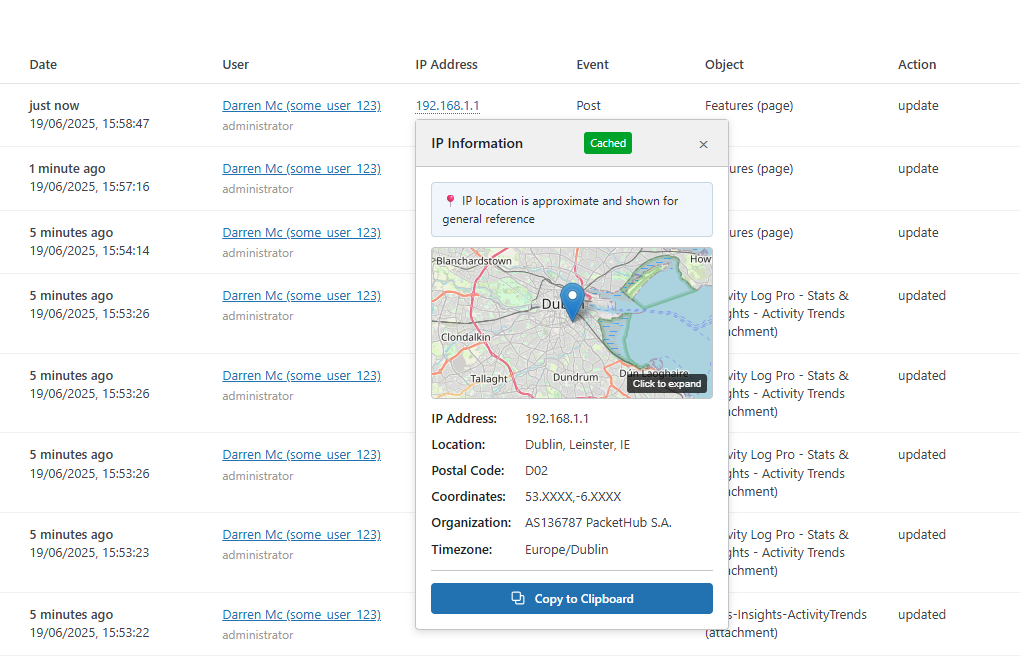
IP address tracking for security analysis
User role-based activity permissions
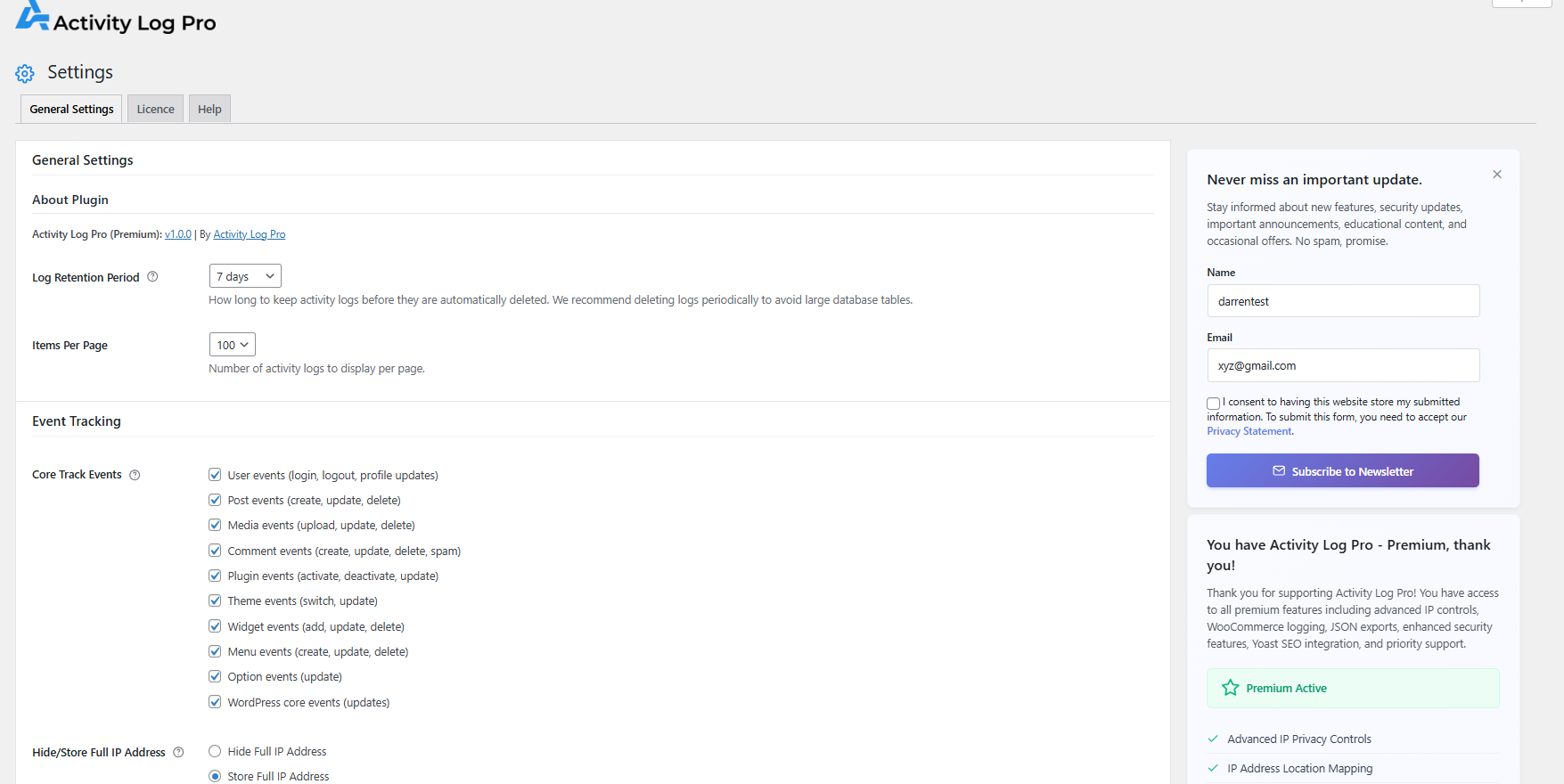
Customizable data retention policies
Export capabilities (CSV, JSON, HTML and TXT formats)
Recorded Notes — Add your own notes directly to the activity log to document off-site work, server changes, or any action WordPress can’t capture automatically. Set severity, add details, and the entry appears in the log like any other event — complete with timestamp and your name.
Clean, responsive admin interface
Database optimization for performance
Premium Features
Upgrade to Activity Log Pro Premium for advanced security and privacy controls:
Advanced IP Privacy Controls – GDPR-compliant IP anonymization and masking options
IP Location Mapping – Geographical insights for visitor analysis and security monitoring
Security Alerts – Security Alerts helps you detect important WordPress activity in real time with instant email notifications for security events, content changes, and core/plugin updates. Configure smart alert cooldowns, choose multiple recipients, and reduce noise while still catching high-risk behavior fast.
Log Channels – Centralise activity logs from all your WordPress sites into one platform. Stream every log entry in real time to Grafana Loki, Better Stack, Slack, Papertrail, Loggly, Datadog, Syslog/SIEM targets, or your own custom webhook endpoint. Ideal for agencies, WordPress maintenance services, and freelancers managing multiple client sites.
Recorded Notes (Advanced) – Backdate recorded notes to any past date and time, and attribute them to another user (e.g. document work done by a colleague or client). Critical and high-severity notes can optionally trigger Security Alerts.
Enhanced Security Features – Real-time logs and suspicious activity logs (via Live Monitor)
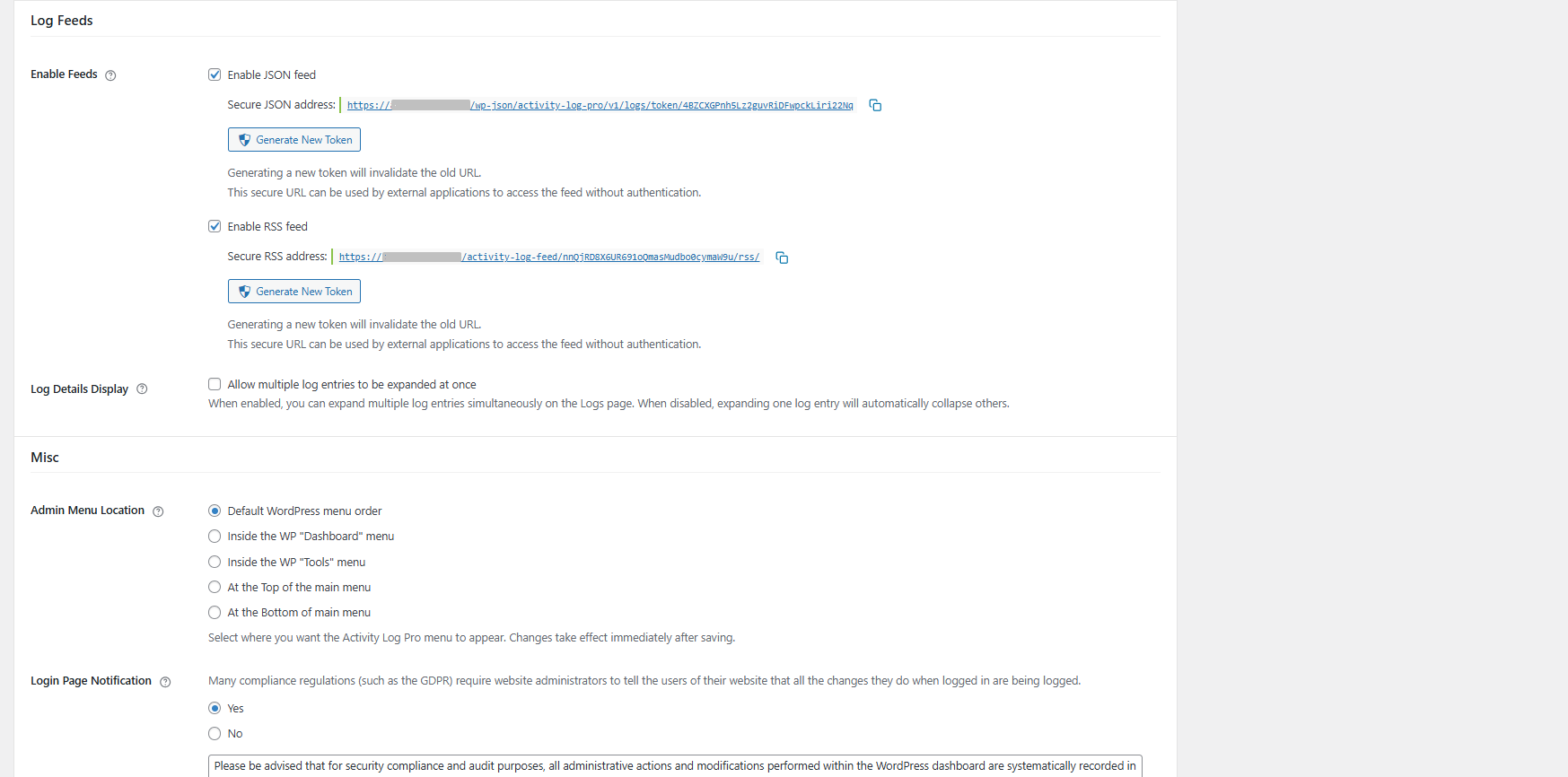
JSON Feed Export – SIEM integration with secure token-based access
Centralised Logging for Agencies & WordPress Maintenance Services
Managing multiple WordPress sites? Log Channels (Premium) lets you stream activity logs from every client site into a single external logging platform — so you can monitor all your sites in one place, without logging into each WordPress admin individually.
How it works: Install Activity Log Pro on each WordPress site, configure a Log Channel pointing to your preferred logging platform, and every activity log entry is forwarded in real time. Each event is automatically tagged with the site name and site URL, so you can filter, search, and alert by site inside your chosen platform.
Supported platforms — bring your own logging stack:
Better Stack — Stream logs to your Better Stack Logs source; filter by site in the Telemetry dashboard
Datadog — Forward logs to your Datadog account; filter by site_name or site_url in Logs Search
Loggly — Centralise logs in Loggly; tag and query by site across your entire client portfolio
Papertrail — Route logs via HTTPS token or classic Syslog to your Papertrail destinations
Slack — Push activity events to a Slack channel for real-time awareness across all sites
Custom Webhook / Syslog / SIEM — Connect to any endpoint or enterprise SIEM platform
Why agencies and maintenance services choose Log Channels:
One dashboard, all sites — view and search logs from every client site in your existing logging platform
No vendor lock-in — choose the platform you already use; no new SaaS subscription required
Tamper-proof audit trail — if a site is compromised and an attacker clears the on-site logs, your external copy is already safely stored and completely out of reach
Zero performance impact — log delivery runs asynchronously in background jobs; visitors and admins never wait for external services to respond
Multiple simultaneous channels — send logs to Datadog for archiving and Slack for real-time alerts at the same time
Per-channel test button — verify each connection is working before you rely on it
Configurable Data Retention – Meet your privacy requirements with customizable retention periods
Administrator-Only Access – All plugin features require administrator privileges for security
Perfect For
Business Websites & Corporate Sites: Maintain GDPR compliance, PCI DSS standards, and audit trail requirements for regulatory inspections and security protocols.
WooCommerce & E-commerce Stores: Track order modifications, product changes, inventory adjustments, customer data access, and payment processing for fraud prevention and compliance.
Multi-user WordPress Sites: Monitor team member activities, role changes, content approvals, and administrative access for complete user accountability.
Digital Agencies, WordPress Maintenance Services & Freelancers: Centralise activity logs across all your client sites into a single logging platform like Datadog, Better Stack, or Loggly. Each log entry is tagged with the site name and URL, giving you a unified, searchable audit trail across your entire portfolio — without logging into each site individually. Use Log Channels (Premium) to stream logs from all your client sites to your existing stack. No new SaaS dashboard required — bring your own logging platform and stay in control of your data.
Membership Sites & Private Communities: Track member activities, subscription changes, content access, and community moderation actions.
Educational Institutions & Learning Management: Monitor student submissions, instructor activities, course content changes, and user enrollment modifications.
News & Publishing Websites: Monitor editorial workflows, content publication schedules, author activities, and SEO optimization changes.
Easy Setup & Configuration
Get started in minutes:
1. Install and activate the plugin – it works out of the box with default settings
2. Configure which activities to track (optional)
3. Set your data retention preferences (optional)
4. Start monitoring immediately
(There are various other Settings for you to explore)
No complex setup required — this WordPress activity log works right away with sensible defaults while offering extensive customization options for advanced users.
Use Cases
This user activity log helps you answer the questions that matter most:
Troubleshooting: “What changed right before the site broke?” Security Monitoring: “Who attempted to login with admin credentials?” Content Management: “When was this post last modified and by whom?” Compliance: “Show me all user activities for the past 6 months” Performance: “What plugins were recently activated that might be slowing the site?” Multi-Site Management: “Which of my client sites had a plugin deactivated, a user role changed, or a new admin added today?”
Activity Log Pro logs user activities on your WordPress site. This may include:
User login/logout times and IP addresses (anonymized by default)
Content creation, modification, and deletion activities
Plugin and theme changes
Administrative actions
Data Storage: Activity logs are stored locally in your WordPress database by default. No log data is sent to external services unless you explicitly enable a Log Channel (Premium), which can forward copies of logs to services like Datadog, Grafana Loki, Better Stack, and others.
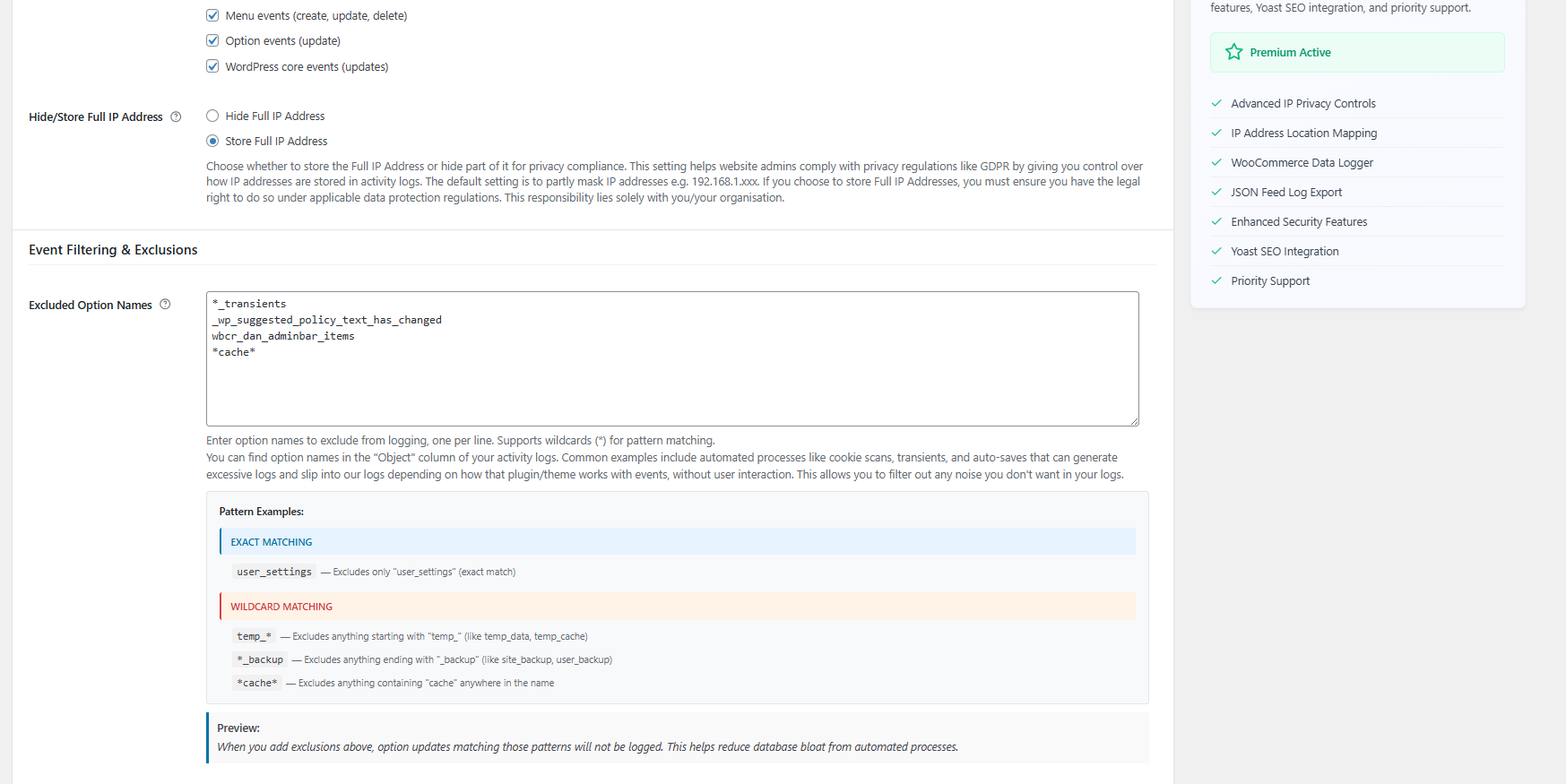
IP Address Privacy: IP addresses are automatically anonymized by default (e.g., 192.168.1.xxx) for privacy protection. Full IP addresses are only stored if explicitly enabled by administrators in the premium version.
Third-Party Services: The plugin uses ipinfo.io for optional IP geolocation lookups when administrators manually request location information, and LemonSqueezy for payment processing when users choose to purchase premium features and for newsletter subscriptions when users voluntarily sign up. The ipinfo.io service is only used when explicitly requested and data is cached locally. LemonSqueezy is only used when users voluntarily initiate premium purchases, subscription management, or newsletter signups.
Data Retention: You can configure data retention periods to meet your privacy requirements. You can configure a secure JSON feed, with access via a secure authentication token, available in Premium → activitylog.pro/pricing
Support
For support, documentation, and feature requests, please visit:
This plugin uses the following third-party services:
IP Geolocation Service (ipinfo.io)
– Purpose: Provides geographical location data for IP addresses to enhance security monitoring
– Data Sent: IP addresses are sent to ipinfo.io for location lookup when administrators manually request IP location information
– When Used: Only when administrators manually request IP location information via the admin interface
– Privacy Policy: https://ipinfo.io/privacy-policy
– Terms of Service: https://ipinfo.io/terms-of-service
– Data Storage: Location data is cached locally for 24 hours to minimize API calls
– User Control: This feature is optional and only available to administrators who explicitly request IP location data
Payment Processing Service (LemonSqueezy)
– Purpose: Handles secure payment processing, license validation, and subscription management for premium features
– Data Sent: When users choose to purchase premium plans, payment information (credit card details, billing address), email address, and license details are processed by LemonSqueezy
– When Used: Only when users voluntarily initiate premium plan purchases, license activation, or subscription management
– Privacy Policy: https://www.lemonsqueezy.com/privacy
– Terms of Service: https://www.lemonsqueezy.com/terms
– Data Storage: Payment and license data is managed entirely by LemonSqueezy – no payment information is stored on your WordPress site
– User Control: Users have complete control over whether to purchase premium features and can manage their subscriptions through LemonSqueezy’s customer portal
Newsletter Subscription Service (LemonSqueezy)
– Purpose: Allows users to voluntarily subscribe to product updates and educational content newsletters
– Data Sent: Name and email address only when users explicitly choose to subscribe to the newsletter
– When Used: Only when users voluntarily fill out and submit the newsletter subscription form in the plugin settings
– Privacy Policy: https://www.lemonsqueezy.com/privacy
– Terms of Service: https://www.lemonsqueezy.com/terms
– Data Storage: Newsletter subscription data is managed by LemonSqueezy – no subscription information is stored on your WordPress site
– User Control: Users have complete control over newsletter subscription and can unsubscribe at any time via email links or LemonSqueezy’s customer portal
Activity Log Pro is engineered for minimal performance impact. It uses a custom database table and optimized queries to ensure efficient logging. For most sites, the overhead is negligible, but as with any logging plugin, there is some additional database activity during user actions. Log retention and caching features help maintain long-term performance. There is also an exclusion filter to prevent any event getting logged.
Is this plugin GDPR compliant?
Yes, this plugin includes GDPR-ready features to help with GDPR compliance including IP anonymization, data retention controls, and the ability to delete user-specific logs upon request. Compliance responsibility lies solely with you/your organisation.
My site has too many log entries from automated processes. How can I reduce the noise?
Activity Log Pro includes a powerful exclusion feature to filter out unwanted automated entries while preserving important security and audit information.
To set up exclusions:
Go to Activity Log Pro > Settings
Find the “Event Filtering & Exclusions” section
Use the “Excluded Option Names” field to specify what to exclude
Exclusion methods:
Exact matching: Enter specific option names like user_session_data
Wildcard patterns: Use * as placeholder:
temp_* excludes anything starting with “temp_”
*_backup excludes anything ending with “_backup”
*cache* excludes anything containing “cache”
Common exclusion patterns:
Important: Exclusions only prevent future logging – existing logs remain unchanged. Start with specific exclusions before using broad wildcard patterns.
By default, logs are stored for 30 days. You can customize this in the plugin settings to any period from 7 days to 365 days retention (365 days is not recommended for performance reasons).
Can I export the activity logs?
Yes! You can export logs in multiple formats including CSV, JSON, HTML and TXT formats. Exports can be filtered by date range, user, activity type, and more.
Can I exclude events from the logs screen?
Yes, Activity Log Pro provides both filtering and exclusion capabilities:
Real-time Filtering (on logs screen):
Date Range: Filter by specific date ranges
User: Filter by specific users
Event Type: Filter by categories (user, post, comment, etc.)
Action: Filter by actions (create, update, delete, etc.)
Search: Context-aware search across all log fields
Multiple filters can be combined for precise results
Permanent Exclusions (in settings):
Excluded Option Names: Prevent specific option updates from being logged
Found in Settings > Event Filtering & Exclusions
Supports exact matches and wildcards (e.g. temp_, _backup, cache etc)
Useful for excluding automated processes, transients, and auto-saves
Reduces database bloat from noise events
One option name per line in the textarea
The filtering is temporary (for viewing) while exclusions are permanent (prevents logging entirely).
Does it work with multisite installations?
Activity Log Pro can be installed on WordPress multisite networks and will function on individual sites within the network. However, the current version does not include network-wide administration features or centralized logging across network sites. Each site in the network maintains its own separate activity logs.
Can I monitor multiple WordPress sites from one central place?
Yes — with Log Channels (Premium) you can stream activity logs from every WordPress site to a single external logging platform such as Better Stack, Datadog, Loggly, or Papertrail. Every log entry is automatically tagged with the site name and URL, so you can filter and search across all your sites in one place.
This makes Log Channels the ideal solution for agencies, WordPress maintenance services, and freelancers managing multiple client sites. You use the logging platform you already have — no extra SaaS subscription required.
Currently, we have deep integrations with WooCommerce and Yoast SEO, with more coming soon. The plugin also works seamlessly with most other WordPress plugins.
Can I customize what activities are tracked?
Yes, the plugin includes granular controls to enable or disable tracking for specific activity types. You can track everything or only the activities that matter to your site.
Is technical support provided?
Yes, I provide comprehensive support. The free version support is via the WordPress plugin support forum. Premium support options are via 👉 activitylog.pro/support →
Can I track custom post types?
Yes, Activity Log Pro automatically tracks all custom post types in addition to standard WordPress posts and pages.
How do I view failed login attempts?
Failed login attempts are tracked automatically and can be viewed in the main activity dashboard. Filter by “Login_failed” Action to see security-related login issues.
What happens to my data if I uninstall the plugin?
Activity Log Pro includes a complete uninstall process that removes all plugin data, all logs, custom tables and settings when you choose to uninstall. This ensures your database remains clean and optimized with no leftover data or performance impact. Set the “Remove all plugin data on uninstall” option in “Uninstall Clean-up” within Settings.
What’s the difference between free and premium versions?
The free version includes comprehensive activity logging for all WordPress core functions. Premium adds advanced privacy controls, enhanced security features, IP location mapping, SIEM integration capabilities, and priority support. View full Premium Features 👉 activitylog.pro/pricing →.
Are there any known limitations?
Multisite networks: Each site maintains its own separate on-site logs. For centralised multi-site logging across independent WordPress installs, use Log Channels (Premium) to stream all sites into a single external platform such as Datadog, Better Stack, or Loggly — each log entry tagged by site name and URL.
Administrator-only access: Requires manage_options capability – only Administrators and Super Admins can access plugin features
High-traffic sites: Consider adjusting retention periods for optimal performance
Memory-intensive operations: May require increased PHP memory limits for large exports or extensive logging
Feed export limits: RSS/JSON feeds are limited to 50-100 entries per request
Real-time logging: Continuous logging may impact performance on extremely high-traffic sites
Database dependency: Uses MySQL/MariaDB-specific features and functions
New: AI & Connectors logging (Free) — Log WordPress 7.0+ connector API keys saved, removed, or updated (masked last four only), AI plugin feature toggles, and provider access approvals (Connector Approvals screen: approve, dismiss, matrix toggles). Toggle in Settings; full API keys and prompt content are never stored.
New: AI & Connectors Security Alert (Premium) — Optional alert under Security Alerts for all AI and connector log events (off by default until Alerts are enabled).
Fix: WordPress core update alert emails and activity log entries now use the correct version after upgrades and reinstalls.
Fix: Activity Logs UI in the Severity and User columns — long usernames truncate with a hover tooltip.
Enhanced: User Card — Added last login metric from the activity log.
Enhanced: Verified compatibility with WordPress 7.1.3.
1.2.1 | September 23, 2026
New: Email Logging (Premium) — Optionally log outbound emails sent via wp_mail(). Records recipient, subject, CC, BCC, From, and send status (sent/failed). Email body and attachments are never stored. Disabled by default. Includes sub-option to exclude Activity Log Pro’s own emails (digests and security alerts).
New: Excluded Roles (Free) — Select user roles whose activity should not be logged. The Administrator role cannot be excluded. Security events (login, logout, failed login) are always recorded.
New: Excluded Users (Free) — Exclude specific users by username or email address, one per line. Security events are always recorded for excluded users. Warnings are shown when excluding an admin-role user or your own account.
New: Active Filter Chips (Free) — Applied filters show as dismissible chips above the log table; filter by user or severity from any log row.
Enhanced: Verified compatibility with WordPress 7.1.1.
Enhanced: Languages updated.
1.2.0 | September 10, 2026
New: User Card (Free) — Click a username in the activity log for a profile popover with online status, event stats, and quick actions; premium adds login history, recent activity, and security insights.
New: Filter by IP (Free) — Filter the activity log to a single IP address with one click from any log row or IP info modal; ideal for security investigations.
New: Log Actions Bar on the Activity Logs screen — Record Note, Create Alert, Forward Logs, and Export.
New: Recorded Notes (Free) — Add notes to the activity log from the Activity Logs screen with a message, optional details, and severity; included in exports, digests, Log Channels, and feeds.
New: Recorded Notes — Backdate & Attribution (Premium) — Backdate notes in the log or record them on behalf of another user; the recording admin is always stored for audit.
New: Recorded Notes — Security Alerts (Premium) — Critical and high-severity recorded notes automatically trigger a Security Alert email when Security Alerts are enabled.
Enhanced: Plugin & Theme context (Free) — Plugin and theme events now capture author, homepage URI, and description in event metadata.
Enhanced: Expanded log details (Free) — new plugin and theme fields in Complete Metadata, Show JSON, exports, and feeds; homepage links are clickable.
1.1.0 | August 28, 2026
Enhanced: Further Compatibility with WordPress 7.1.
Enhanced: Log Channels – Datadog Channel (Premium) — Datadog Site endpoints are now loaded dynamically from Datadog; added support for the new UK1 region.
Enhanced: Excluded Post Types (Premium) — Optional setting to show private/internal custom post types in the exclusion list.
Fixed: Premium plugin updates (Premium) — Fixed one-click updates failing with “Download failed. Forbidden” or “Too Many Requests”.
1.0.9 | June 19, 2026
New: Live Sessions (Free) — Monitor all active WordPress login sessions from a dedicated admin screen. View user, role, IP address, browser/OS, login time, session ID, and session expiry. Search and filter by username or role, highlight concurrent sessions, optional live polling, and one-click links to trace activity for each session.
New: Live Sessions (Free) — Active / Idle status — See which users are currently active in the WordPress dashboard (configurable threshold: 5, 10, or 15 minutes).
New: Live Sessions (Premium) — Terminate individual sessions, emergency lockdown (log out everyone except you), simultaneous session limits, geolocation, full IP display, and session management email alerts (new login, terminated, blocked, emergency lockdown).
Fixed: Download Session Issue (Premium) — A download session timeout issue that could cause updates to fail with “Download failed. Forbidden”.
1.0.8 | May 22, 2026
New: Site Health Monitor (Free) — When WordPress runs its Site Health checks, we now note important changes in your activity log: a new problem showing up, a problem clearing up, or the seriousness level shifting. You can turn this on or off under Settings > Event Tracking.
New: Security Alerts (Premium) — Under Core & Plugin Alerts, you can choose to get an email when WordPress flags a critical Site Health issue (the same kind of serious warning you see on the Site Health screen). Other Site Health changes stay in the log only; only critical issues can trigger mail when you enable this option.
Enhanced: View Site Health — In the activity log, expanding a Site Health entry shows a View Site Health link so you can open the WordPress Site Health screen in one click.
Enhanced: Compatibility with WordPress 7.0 visual styling to match the latest WordPress design – Admin styles aligned with WP 7.0 core UI (compatible with WordPress 5 and 6).
1.0.7.1 | May 12, 2026
Maintenance: Hardened the severity column database migration for Plugin Check / coding standards (sanitised table identifier; PHPCS suppressions scoped to schema-only queries).
1.0.7 | May 11, 2026
New: Logging Levels (Free) – ‘Severity’ has been added to every activity entry — Critical, High, Medium, Low, and Info — so it’s easier to quickly identify important events. You can now filter by Severity level in the admin log view, see clear severity badges, and include levels in exports and secure JSON/RSS feeds.
Fixed: Security Alerts now honour Excluded Post Types — publish, update, trash, delete, and related media alerts no longer fire for excluded post types (attachments respect the same parent-type exclusion rules as logging). – (Thanks to Julia Elliott for reporting)
Enhanced: Alert emails (Premium) — event details now include the Site URL.
1.0.6 | April 29, 2026
New: Log Channels (Premium) – Introducing Log Channels, Route activity log events to external destinations in real-time. Send logs to Grafana Loki, Better Stack, Slack, Papertrail, Loggly, Datadog, custom Syslog/SIEM targets, or your own custom Webhook endpoint. (Premium)
New: Login Flood Guard (Free) — Caps repeated failed-login log rows during attacks (20/50/100/200); optional toggle under Security events; notice on Activity Logs when suppression runs. (Free)
New: Daily Groups (Free) – Displays a visual section header showing ‘Today’, ‘Yesterday’, ‘X days ago’, in the Activity Logs table when sorting by Date. (Free)
Fixed: JSON feed works more reliably alongside BuddyPress and similar community plugins. (Premium) – (Thanks to David Luiz Adeniji for reporting)
1.0.5 | April 14, 2026
New: Security Alerts – Receive instant email notifications for important security, content, and core/plugin events. Configure alert cooldown periods, set multiple recipients, and choose which categories to monitor: Security Alerts, Content Change Alerts, or Core & Plugin Alerts. (Premium).
New: Option to exclude media attachments deleted from Excluded Post Types. (Premium)
Enhanced: Added Log Retention period and next scheduled Auto-Purge date to the activity log summary Stats Box
Enhanced: Stats & Insights – Stat Cards are now pre-filtered – click any card to jump directly to the Activity Logs screen with that event type pre-filtered.
Fixed: User filter dropdown now shows all users with logged activity, including those with custom roles (e.g. from themes like Houzez).
Fixed: Media exclusion not applying correctly in certain configurations.
New: Premium add-on now supports secure, token-based automatic updates via Lemon Squeezy. (A one-off manually update of premium is required) – Download it from your account: https://app.lemonsqueezy.com/my-orders/
Fixed: Resolved duplicate integration initialization preventing conflicts with WooCommerce. (Premium)
Fixed: WooCommerce system status page now displays correctly with premium features active. (Premium)
Fixed: REST API authentication compatibility for WooCommerce integrations. (Premium)
Fixed: Category and Tag activities (create, edit, delete) are now properly logged for Posts > Categories and Posts > Tags – (Thanks to Nikhil @nikhilpatel68 for reporting)
1.0.3.1 | November 24, 2025
Added: Option to Exclude Media Attachments uploaded to Excluded Post Types. (Premium)
Fixed: Fixed some small bugs.
Enhanced: Tested on WordPress 6.9 (RC2).
Enhanced: Languages updated.
1.0.3 | November 13, 2025
Added: Excluded Post Types feature (Premium) – Select custom post types to exclude from activity logging
Fixed: Premium plugin initialization timing to resolve activation dependency issues
Fixed: License tab rendering when premium plugin is active
Fixed: Extension interface loading sequence for proper premium feature registration
Enhanced: Custom Post Type exclusion now works across all logging methods (create, update, delete, status transitions)
1.0.2 | October 24, 2025
Added: Activity Digest Email Reports – Automated daily, weekly, or monthly email summaries of site activity
Added: Customizable email schedules with timezone support and multiple recipient support
Added: Email Schedule Status display showing cron status, next run time, and last sent timestamp
Added: Test email functionality and email preview for digest reports
Added: Excluded Option Names filtering – Now Easily Filter out unwanted option logs (transients, cache, etc.)
Enhanced: Settings UI with improved layout and professional status indicators
Enhanced: Log descriptions now highlight “changed from/to” values with color-coded display for easier comparison
Enhanced: Array and object values in logs now show actual content instead of generic “[array]” placeholder
Fixed: Settings save functionality to prevent duplicate submissions
1.0.1 | September 23, 2025
Added: New Dashboard widgets: (1) Daily Activity, (2) Activity by Event Type, (3) Action Type Distribution, (4) Peak Activity Times.