

Wordfence Security is a free enterprise class security plugin that includes a firewall, virus scanning, real-time traffic with geolocation and more.
| Author: | Wordfence (profile at wordpress.org) |
| WordPress version required: | 3.9 |
| WordPress version tested: | 6.5 |
| Plugin version: | 7.11.5 |
| Added to WordPress repository: | 21-04-2012 |
| Last updated: | 21-03-2024 |
| Rating, %: | 94 |
| Rated by: | 4121 |
| Plugin URI: | https://www.wordfence.com/ |
| Total downloads: | 344 847 933 |
| Active installs: | 5 000 000+ |
 Click to start download |
|
THE MOST POPULAR WORDPRESS FIREWALL & SECURITY SCANNER
WordPress security requires a team of dedicated analysts researching the latest malware variants and WordPress exploits, turning them into firewall rules and malware signatures, and releasing those to customers in real-time. Wordfence is widely acknowledged as the number one WordPress security research team in the World. Our plugin provides a comprehensive suite of security features, and our team’s research is what powers our plugin and provides the level of security that we are known for.
At Wordfence, WordPress security isn’t a division of our business – WordPress security is all we do. We employ a global 24 hour dedicated incident response team that provides our priority customers with a 1 hour response time for any security incident. The sun never sets on our global security team and we run a sophisticated threat intelligence platform to aggregate, analyze and produce ground breaking security research on the newest security threats.
Wordfence Security includes an endpoint firewall, malware scanner, robust login security features, live traffic views, and more. Our Threat Defense Feed arms Wordfence with the newest firewall rules, malware signatures and malicious IP addresses it needs to keep your website safe. Rounded out by 2FA and a suite of additional features, Wordfence is the most comprehensive WordPress security solution available.
WORDPRESS FIREWALL
- Web Application Firewall identifies and blocks malicious traffic. Built and maintained by a large team focused 100% on WordPress security.
- [Premium] Real-time firewall rule and malware signature updates via the Threat Defense Feed (free version is delayed by 30 days).
- [Premium] Real-time IP Blocklist blocks all requests from the most malicious IPs, protecting your site while reducing load.
- Protects your site at the endpoint, enabling deep integration with WordPress. Unlike cloud alternatives does not break encryption, cannot be bypassed and cannot leak data.
- Integrated malware scanner blocks requests that include malicious code or content.
- Protection from brute force attacks by limiting login attempts.
WORDPRESS SECURITY SCANNER
- Malware scanner checks core files, themes and plugins for malware, bad URLs, backdoors, SEO spam, malicious redirects and code injections.
- [Premium] Real-time malware signature updates via the Threat Defense Feed (free version is delayed by 30 days).
- Compares your core files, themes and plugins with what is in the WordPress.org repository, checking their integrity and reporting any changes to you.
- Repair files that have changed by overwriting them with a pristine, original version. Delete any files that don’t belong easily within the Wordfence interface.
- Checks your site for known security vulnerabilities and alerts you to any issues. Also alerts you to potential security issues when a plugin has been closed or abandoned.
- Checks your content safety by scanning file contents, posts and comments for dangerous URLs and suspicious content.
- [Premium] Checks to see if your site or IP have been blocklisted for malicious activity, generating spam or other security issue.
LOGIN SECURITY
- Two-factor authentication (2FA), one of the most secure forms of remote system authentication available via any TOTP-based authenticator app or service.
- Login Page CAPTCHA stops bots from logging in.
- Disable or add 2FA to XML-RPC.
- Block logins for administrators using known compromised passwords.
WORDFENCE CENTRAL
- Wordfence Central is a powerful and efficient way to manage the security for multiple sites in one place.
- Efficiently assess the security status of all your websites in one view. View detailed security findings without leaving Wordfence Central.
- Powerful templates make configuring Wordfence a breeze.
- Highly configurable alerts can be delivered via email, SMS or Slack. Improve the signal to noise ratio by leveraging severity level options and a daily digest option.
- Track and alert on important security events including administrator logins, breached password usage and surges in attack activity.
- Free to use for unlimited sites.
SECURITY TOOLS
- With Live Traffic, monitor visits and hack attempts not shown in other analytics packages in real time; including origin, their IP address, the time of day and time spent on your site.
- Block attackers by IP or build advanced rules based on IP Range, Hostname, User Agent and Referrer.
- Country blocking available with Wordfence Premium.
Screenshots

The dashboard gives you an overview of your site's security including notifications, attack statistics and Wordfence feature status.
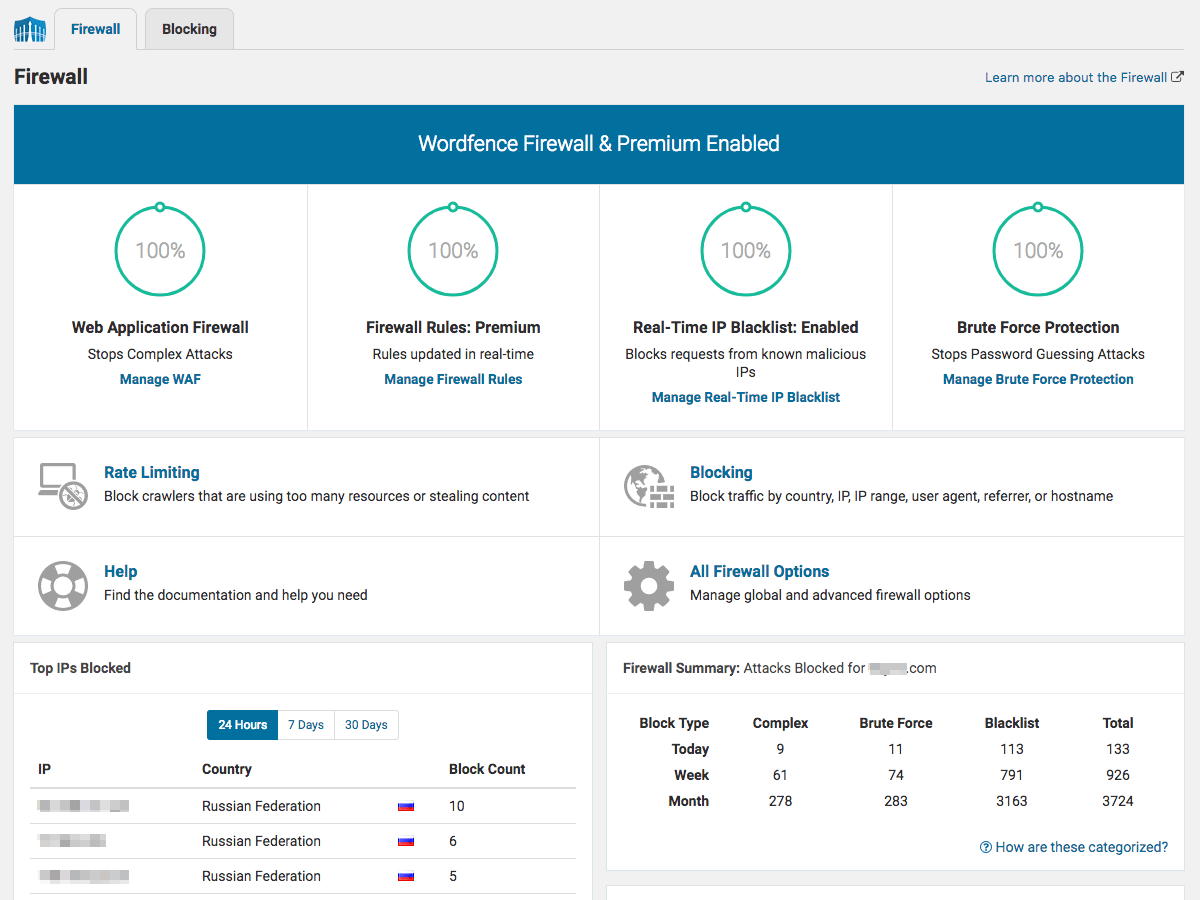
The firewall protects your site from common types of attacks and known security vulnerabilities.
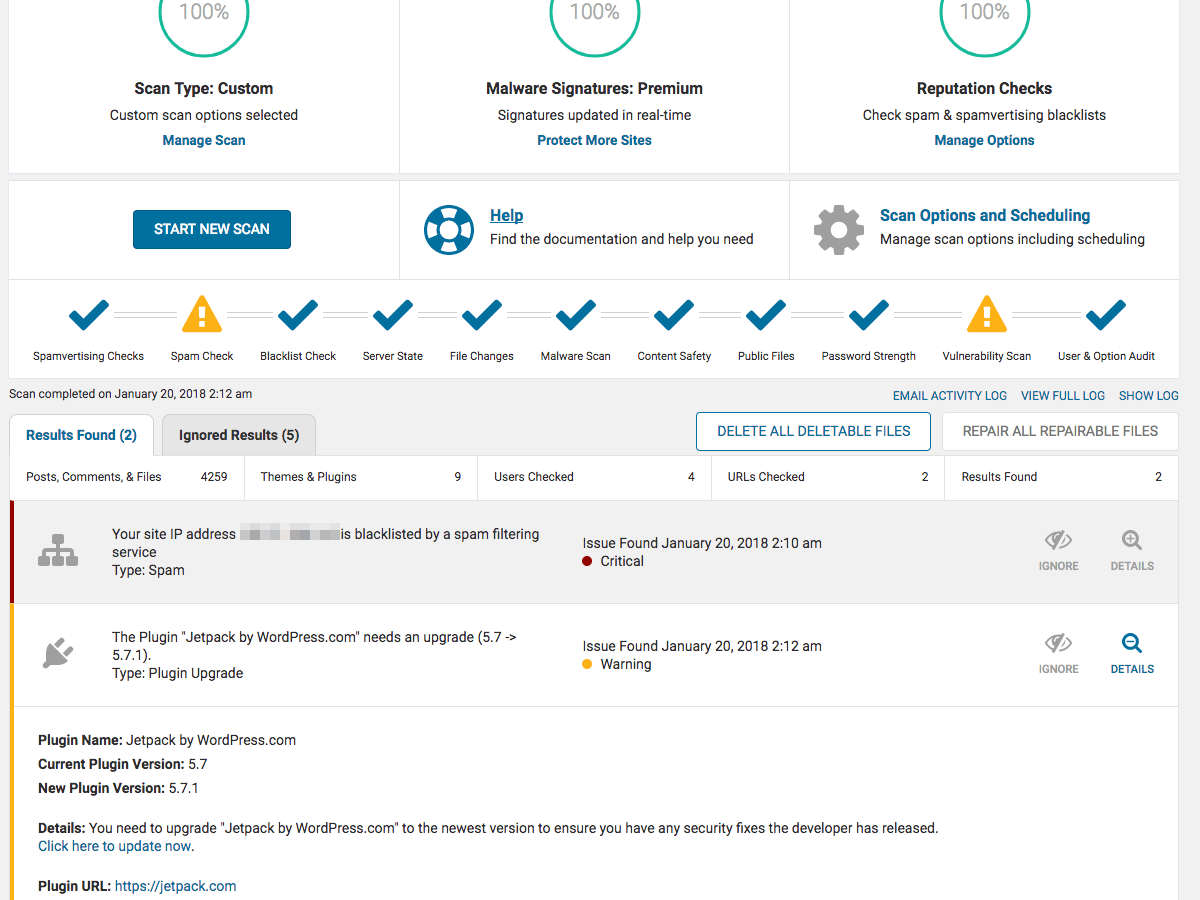
The Wordfence Security Scanner lets you know if your site has been compromised and alerts you to other security issues that need to be addressed.
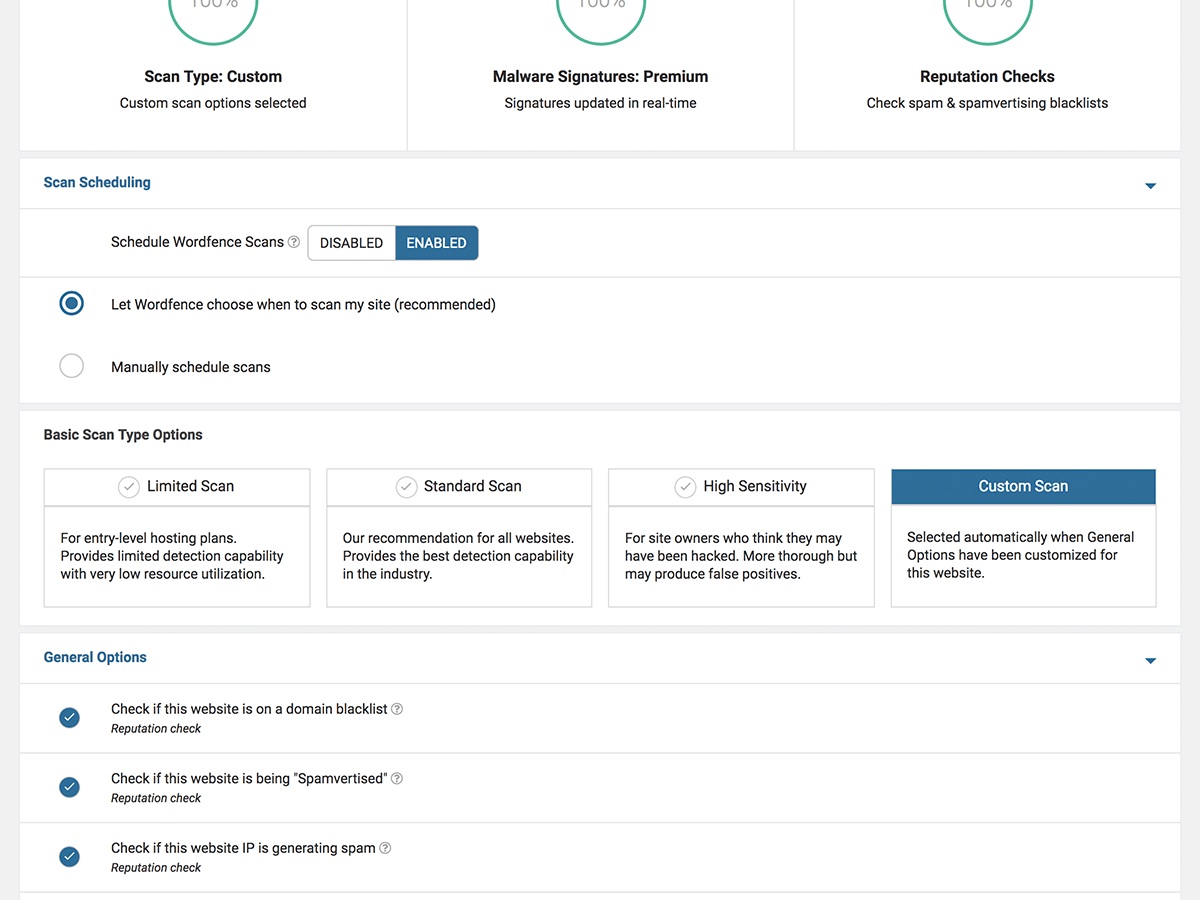
Wordfence is highly configurable, with a deep set of options available for each feature. High level scan options are shown above.

Brute Force Protection features protect you from password guessing attacks.
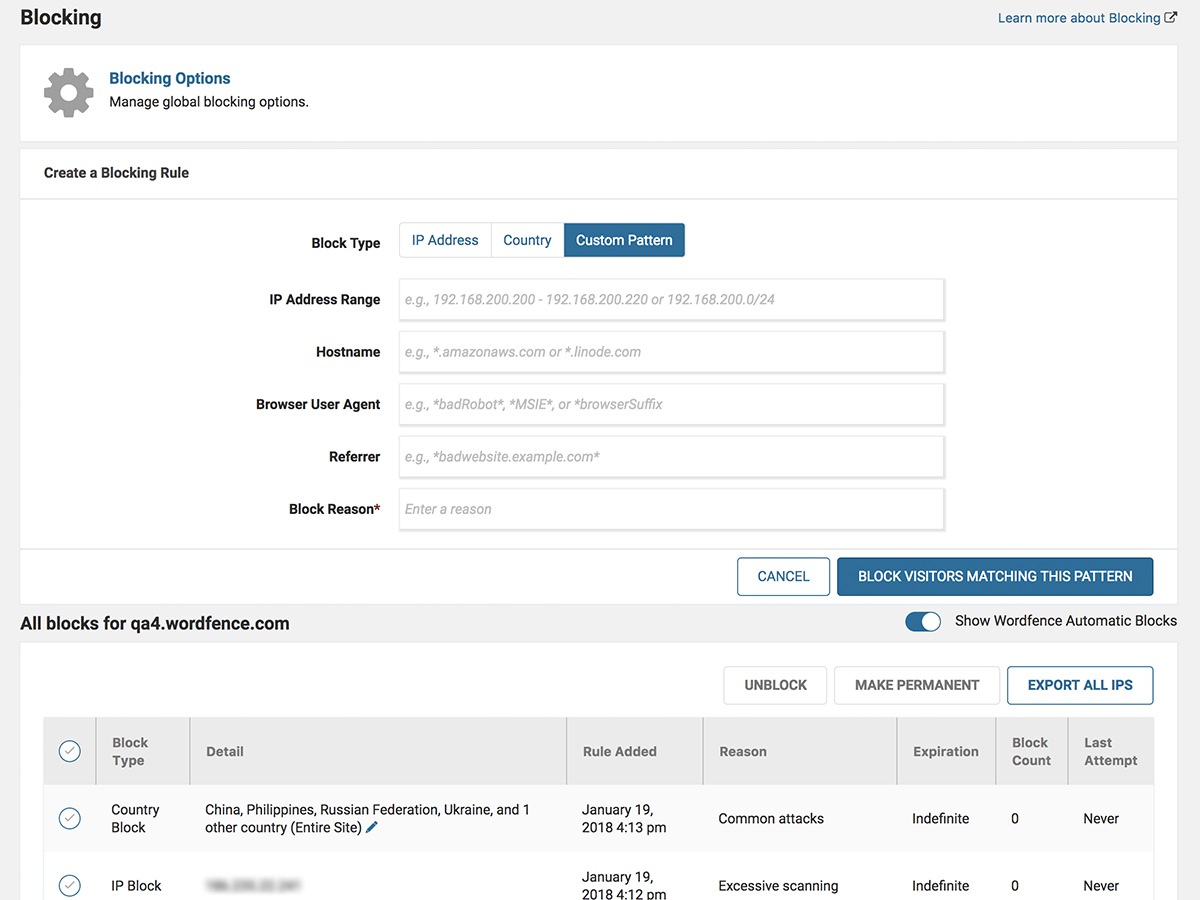
Block attackers by IP, Country, IP range, Hostname, Browser or Referrer.

The Wordfence Live Traffic view shows you real-time activity on your site including bot traffic and exploit attempts.

Take login security to the next level with Two-Factor Authentication.

Logging in is easy with Wordfence 2FA.
The WordPress security plugin provides the best protection available for your website. Powered by the constantly updated Threat Defense Feed, Wordfence Firewall stops you from getting hacked. Wordfence Scan leverages the same proprietary feed, alerting you quickly about security issues or if your site is compromised. The Live Traffic view gives you real-time visibility into traffic and hack attempts on your website. A deep set of additional tools round out the most comprehensive WordPress security solution available.
We offer a Premium API key that gives you real-time updates to the Threat Defense Feed which includes a real-time IP blocklist, firewall rules, and malware signatures. Premium support, country blocking, more frequent scans, and spam and spamvertising checks are also included. Click here to sign-up for Wordfence Premium now or simply install Wordfence free and start protecting your website.
- Web Application Firewall stops you from getting hacked by identifying malicious traffic, blocking attackers before they can access your website.
- Threat Defense Feed automatically updates firewall rules that protect you from the latest threats. Premium members receive the real-time version.
- Block common WordPress security threats like fake Googlebots, malicious scans from hackers and botnets.
- Scans core files, themes and plugins against WordPress.org repository versions to check their integrity. Verify security of your source.
- See how files have changed. Optionally repair changed files that are security threats.
- Scans for signatures of over 44,000 known malware variants that are known WordPress security threats.
- Scans for many known backdoors that create security holes including C99, R57, RootShell, Crystal Shell, Matamu, Cybershell, W4cking, Sniper, Predator, Jackal, Phantasma, GFS, Dive, Dx and many more.
- Continuously scans for malware and phishing URL’s including all URLs on the Google Safe Browsing List in all your comments, posts and files that are security threats.
- Scans for heuristics of backdoors, trojans, suspicious code and other security issues.
- See all your traffic in real-time, including robots, humans, 404 errors, logins and logouts and who is consuming most of your content. Enhances your situational awareness of which security threats your site is facing.
- A real-time view of all traffic including automated bots that often constitute security threats that Javascript analytics packages never show you.
- Real-time traffic includes reverse DNS and city-level geolocation. Know which geographic area security threats originate from.
- Monitors disk space which is related to security because many DDoS attacks attempt to consume all disk space to create denial of service.
- See all your traffic in real-time, including robots, humans, 404 errors, logins and logouts and who is consuming most of your content. Enhances your situational awareness of which security threats your site is facing.
- A real-time view of all traffic including automated bots that often constitute security threats that Javascript analytics packages never show you.
- Real-time traffic includes reverse DNS and city-level geolocation. Know which geographic area security threats originate from.
- Monitors disk space which is related to security because many DDoS attacks attempt to consume all disk space to create denial of service.
Wordfence sends security alerts via email. Once you install Wordfence, you will configure a list of email addresses where security alerts will be sent. When you receive a security alert, make sure you deal with it promptly to ensure your site stays secure.
Wordfence provides true endpoint security for your WordPress website. Unlike cloud based firewalls, Wordfence executes within the WordPress environment, giving it knowledge like whether the user is signed in, their identity and what access level they have. Wordfence uses the user’s access level in more than 80% of the firewall rules it uses to protect WordPress websites. Learn more about the Cloud WAF identity problem here. Additionally, cloud based firewalls can be bypassed, leaving your site exposed to attackers. Because Wordfence is an integral part of the endpoint (your WordPress website), it can’t be bypassed. Learn more about the Cloud WAF bypass problem here. To fully protect the investment you’ve made in your website you need to employ a defense in depth approach to security. Wordfence takes this approach.
- Real-time blocking of known attackers. If another site using Wordfence is attacked and blocks the attacker, your site is automatically protected.
- Block entire malicious networks. Includes advanced IP and Domain WHOIS to report malicious IP’s or networks and block entire networks using the firewall. Report WordPress security threats to network owner.
- Rate limit or block WordPress security threats like aggressive crawlers, scrapers and bots doing security scans for vulnerabilities in your site.
- Choose whether you want to block or throttle users and robots who break your WordPress security rules.
- Premium users can also block countries and schedule scans for specific times and a higher frequency.
- Wordfence Security provides a WordPress Firewall developed specifically for WordPress and blocks attackers looking for vulnerabilities on your site. The Firewall is powered by our Threat Defense Feed which is continually updated as new threats emerge. Premium customers receive updates in real-time.
- Wordfence verifies your website source code integrity against the official WordPress repository and shows you the changes.
- Wordfence scans check all your files, comments and posts for URLs in Google’s Safe Browsing list. We are the only plugin to offer this very important security enhancement.
- Wordfence scans do not consume large amounts of your bandwidth because all security scans happen on your web server which makes them very fast.
- Wordfence fully supports WordPress Multi-Site which means you can security scan every blog in your Multi-Site installation with one click.
- Wordfence includes Two-Factor authentication, the most secure way to stop brute force attackers in their tracks.
- Wordfence fully supports IPv6 including giving you the ability to look up the location of IPv6 addresses, block IPv6 ranges, detect IPv6 country and do a whois lookup on IPv6 addresses and more.
No. Wordfence Security is extremely fast and uses techniques like caching its own configuration data to avoid database lookups and blocking malicious attacks that would slow down your site.
Wordfence Security is able to repair core files, themes and plugins on sites where security is already compromised. You can follow this guide on how to clean a hacked website using Wordfence. If you are cleaning your own site after a hack, note that site security cannot be assured unless you do a full reinstall if your site has been hacked. We recommend you only use Wordfence Security to get your site into a running state in order to recover the data you need to do a full reinstall. If you need help with a security issue, check out Wordfence Care, which offers hands-on support from our team, including dealing with a hacked site. For mission-critical sites, check out Wordfence Response.
Yes. We fully support IPv6 with all security functions including country blocking, range blocking, city lookup, whois lookup and all other security functions. If you are not running IPv6, Wordfence will work great on your site too. We are fully compatible with both IPv4 and IPv6 whether you run both or only one addressing scheme.
Yes. WordPress Multi-Site is fully supported. Using Wordfence you can scan every blog in your network for malware with one click. If one of your customers posts a page or post with a known malware URL that threatens your whole domain with being blocklisted by Google, we will alert you in the next scan.
Providing excellent customer service is very important to us. Our free users receive volunteer-level support in our support forums. Wordfence Premium customers get paid ticket-based support. Wordfence Care customers receive hands-on support including help with security incidents and a yearly security audit. Wordfence Response customers get 24/7/365 support from our incident response team, with a 1 hour response time, and a maximum of 24 hours to resolve a security issue.
Designed for every skill level, The WordPress Security Learning Center is dedicated to deepening users’ understanding of security best practices by providing free access to entry-level articles, in-depth articles, videos, industry survey results, graphics and more.
These are available on our website: Terms of Service and Privacy Policy
7.11.5 – April 3, 2024
- Fix: Revised the behavior of the reCAPTCHA verification to use the documented expiration period of the token and response to avoid sending verification requests too frequently, which could artificially lower scores in some circumstances
- Fix: Addressed PHP 8 deprecation notices in the file differ used by file changed scan results
- Fix: Reduced the frequency of Wordfence Central status update callbacks in sections of the scan that occur quickly in sequence
7.11.4 – March 11, 2024
- Change: CAPTCHA verification when enabled now additionally applies to 2FA logins (may send an email verification on low scores) and no longer reveals whether a user exists for the submitted account credentials (credit: Raxis)
- Fix: Addressed a potential PHP 8 notice in the human/bot detection AJAX call
- Fix: Addressed a potential PHP 8 notice when requesting a lockout unlock verification email
- Fix: Fixed the emailed diagnostics view not showing the missing table information when applicable
- Fix: Improved quick scan logic to base timing on regular scans so they’re more evenly distributed
7.11.3 – February 15, 2024
- Fix: Fixed an issue with sites containing invalid Wordfence Central site data where they could throw an error when viewing Wordfence pages
7.11.2 – February 14, 2024
- Improvement: Enhanced the vulnerability scan to check and alert for WordPress core vulnerabilities and to adjust the severity of the scan result based on findings or available updates
- Improvement: Updated the bundled GeoIP database
- Improvement: Increased compatibility of brute force protection with plugins that override the normal login flow and omit traditional hooks
- Change: Adjusted the behavior of automatic quick scans to schedule themselves further away from full scans
- Fix: Added detection for a site being linked to a non-matching Wordfence Central record (e.g., when cloning the database to a staging site)
- Fix: Streamlined the license and terms of use installation flow to avoid unnecessary prompting
- Fix: Fixed an issue where user profiles with a selected locale different from the site itself could end up loading the site’s locale instead
7.11.1 – January 2, 2024
- Improvement: Added “.env” to the files checked for “Scan for publicly accessible configuration, backup, or log files”
- Improvement: Provided better descriptive text for the option “Block IPs who send POST requests with blank User-Agent and Referer”
- Improvement: The diagnostics page now displays the contents of any
auto_prepend_file.htaccess/.user.ini block for troubleshooting - Fix: Fixed an issue where a login lockout on a WooCommerce login form could fail silently
- Fix: The scan result for abandoned plugins no longer states it has been removed from wordpress.org if it is still listed
- Fix: Addressed an exception parsing date information in non-repo plugins that have a bad
last_updatedvalue - Fix: The URL scanner no longer generates a log warning when matching a potential URL fragment that ends up not being a valid URL
7.11.0 – November 28, 2023
- Improvement: Added new functionality for trusted proxy presets to support proxies such as Amazon CloudFront, Ezoic, and Quic.cloud
- Improvement: WAF rule and malware signature updates are now signed with SHA-256 as well for hosts that no longer build SHA1 support
- Improvement: Updated the bundled trusted CA certificates
- Change: The WAF will no longer attempt to fetch rule or blocklist updates when run via WP-CLI
- Fix: Removed uses of SQL_CALC_FOUND_ROWS, which is deprecated as of MySQL 8.0.17
- Fix: Fixed an issue where final scan summary counts in some instances were not sent to Central
- Fix: Fixed a deprecation notice for get_class in PHP 8.3.0
- Fix: Corrected an output error in the connectivity section of Diagnostics in text mode
7.10.7 – November 6, 2023
- Fix: Compatibility fix for WordPress 6.4 on the login page styling
7.10.6 – October 30, 2023
- Fix: Addressed an issue with multisite installations when the wp_options tables had different encodings/collations
7.10.5 – October 23, 2023
- Improvement: Updated the bundled GeoIP database
- Improvement: Added detection for Cloudflare reverse proxies blocking callbacks to the site
- Change: Files are no longer excluded from future scans if a previous scan stopped during their processing
- Fix: Added handling for the pending WordPress 6.4 change that removes $wpdb->use_mysqli
- Fix: The WAF MySQLi storage engine will now work correctly when either DB_COLLATE or DB_CHARSET are not defined
- Fix: Added additional error handling to Central calls to better handle request failures or conflicts
- Fix: Addressed a warning that would occur if a non-repo plugin update hook did not provide a last updated date
- Fix: Fixed an error in PHP 8 that could occur if the time correction offset was not numeric
- Fix: 2FA AJAX calls now use an absolute path rather than a full URL to avoid CORS issues on sites that do not canonicalize www and non-www requests
- Fix: Addressed a race condition where multiple concurrent hits on multisite could trigger overlapping role sync tasks
- Fix: Improved performance when viewing the user list on large multisites
- Fix: Fixed a UI bug where an invalid code on 2FA activation would leave the activate button disabled
- Fix: Reverted a change on error modals to bring back the additional close button for better accessibility
7.10.4 – September 25, 2023
- Improvement: “Admin created outside of WordPress” scan results may now be reviewed and approved
- Improvement: The WAF storage engine may now be specified by setting the environmental variable “WFWAF_STORAGE_ENGINE”
- Improvement: Detect when a plugin or theme with a custom update handler is broken and blocking update version checks
- Change: Deprecated support for WordPress versions lower than 4.7.0
- Change: Exclude parse errors of a damaged compiled rules file from reporting
- Fix: Suppress PHP notices related to rule loading when running WP-CLI
- Fix: Fixed an issue with the scan monitor cron that could leave it running unnecessarily
7.10.3 – July 31, 2023
- Improvement: Updated GeoIP database
- Fix: Added missing text domain to translation function call
- Fix: Corrected inconsistent styling of switch controls
- Change: Made MySQLi storage engine the default for Flywheel hosted sites
7.10.2 – July 17, 2023
- Fix: Prevented bundled sodium_compat library from conflicting with versions included with older WordPress versions
7.10.1 – July 12, 2023
- Improvement: Added support for processing arrays of files in the WAF
- Improvement: Refactored security event processing to send events in bulk
- Improvement: Updated bundled sodium_compat and random_compat libraries
- Fix: Prevented deprecation warning caused by dynamic property creation
- Fix: Added translation support for additional strings
- Change: Adjusted Wordfence registration UI
7.10.0 – June 21, 2023
- Improvement: Added translation support for strings from login security plugin
- Improvement: Added translator notes regarding word order and hidden text
- Improvement: Added translation support for additional strings
- Improvement: Prevented scans from failing if unreadable directories are encountered
- Improvement: Added help link to IPv4 scan option
- Improvement: Updated scan result text to clarify meaning of plugins removed from wordpress.org
- Improvement: Made “Increased Attack Rate” emails actionable
- Improvement: Updated GeoIP database
- Improvement: Updated JavaScript libraries
- Fix: Corrected IPv6 address expansion
- Fix: Ensured long request payloads for malicious requests are recorded in live traffic
- Fix: Prevented “commands out of sync” database error messages when the database connection has failed
- Fix: Prevented rare JSON encoding issues from breaking free license registration
- Fix: Prevented PHP notice from being logged when request parameter is missing
- Fix: Prevented deprecation warning in PHP 8.1
- Change: Moved detection for old TimThumb files to malware signature
- Change: Moved translation file from .po to .pot
- Change: Renamed “Macedonia” to “North Macedonia, Republic of”
7.9.3 – May 31, 2023
- Improvement: Added exception handling to prevent WAF errors from being fatal
- Fix: Corrected error caused by method call on null in WAF
- Change: Deprecated support for PHP 5.5 and 5.6, ended support for PHP 5.3 and 5.4
- Change: Specified WAF version parameter when requesting firewall rules
7.9.2 – March 27, 2023
- Improvement: The vulnerability severity score (CVSS) is now shown with any vulnerability findings from the scanner
- Improvement: Changed several links during initial setup to open in a new window/tab so it doesn’t interrupt installation
- Change: Removed the non-https callback test to the Wordfence servers
- Fix: Fixed an error on PHP 8 that could occur when checking for plugin updates and another plugin has a broken hook
- Fix: Added a check for disabled functions when generating support diagnostics to avoid an error on PHP 8
- Fix: Prevent double-clicking when activating 2FA to avoid an “already set up” error
7.9.1 – March 1, 2023
- Improvement: Further improved performance when viewing 2FA settings and hid user counts by default on sites with many users
- Fix: Adjusted style inclusion and usage to prevent missing icons
- Fix: Avoided using the ctype extension as it may not be enabled
- Fix: Prevented fatal errors caused by malformed Central keys
7.9.0 – February 14, 2023
- Improvement: Added 2FA management shortcode and WooCommerce account integration
- Improvement: Improved performance when viewing 2FA settings on sites with many users
- Improvement: Updated GeoIP database
- Fix: Ensured Captcha and 2FA scripts load on WooCommerce when activated on a sub-site in multisite
- Fix: Prevented reCAPTCHA logo from being obscured by some themes
- Fix: Enabled wfls_registration_blocked_message filter support for WooCommerce integration
7.8.2 – December 13, 2022
- Fix: Releasing same changes as 7.8.1, due to wordpress.org error
7.8.1 – December 13, 2022
- Improvement: Added more granualar data deletion options to deactivation prompt
- Improvement: Allowed accessing diagnostics prior to completing registration
- Fix: Prevented installation prompt from displaying when a license key is already installed but the alert email address has been removed
7.8.0 – November 28, 2022
- Improvement: Added feedback when login form is submitted with 2FA
- Fix: Restored click support on login button when using 2FA with WooCommerce
- Fix: Corrected display issue with reCAPTCHA score history graph
- Fix: Prevented errors on PHP caused by corrupted login timestamps
- Fix: Prevented deprecation notices on PHP 8.2 related to dynamic properties
- Change: Updated Wordfence registration workflow
7.7.1 – October 4, 2022
- Fix: Prevented scan resume attempts from repeating indefinitely when the initial scan stage fails
7.7.0 – October 3, 2022
- Improvement: Added configurable scan resume functionality to prevent scan failures on sites with intermittent connectivity issues
- Improvement: Added new scan result for vulnerabilities found in plugins that do not have patched versions available via WordPress.org
- Improvement: Implemented stand-alone MMDB reader for IP address lookups to prevent plugin conflicts and support additional PHP versions
- Improvement: Added option to disable looking up IP address locations via the Wordfence API
- Improvement: Prevented successful logins from resetting brute force counters
- Improvement: Clarified IPv6 diagnostic
- Improvement: Included maximum number of days in live traffic option text
- Fix: Made timezones consistent on firewall page
- Fix: Added “Use only IPv4 to start scans” option to search
- Fix: Prevented deprecation notices on PHP 8.1 when emailing the activity log
- Fix: Prevented warning on PHP 8 related to process owner diagnostic
- Fix: Prevented PHP Code Sniffer false positive related to T_BAD_CHARACTER
- Fix: Removed unsupported beta feed option
7.6.2 – September 19, 2022
- Improvement: Hardened 2FA login flow to reduce exposure in cases where an attacker is able to obtain privileged information from the database
7.6.1 – September 6, 2022
- Fix: Prevented XSS that would have required admin privileges to exploit (CVE-2022-3144)
7.6.0 – July 28, 2022
- Improvement: Added option to start scans using only IPv4
- Improvement: Added diagnostic for internal IPv6 connectivity to site
- Improvement: Added AUTOMATIC_UPDATER_DISABLED diagnostic
- Improvement: Updated password strength check
- Improvement: Added support for scanning plugin/theme files in when using the WP_CONTENT_DIR/WP_PLUGIN_DIR constants
- Improvement: Updated GeoIP database
- Improvement: Made DISABLE_WP_CRON diagnostic more clear
- Improvement: Added “Hostname” to Live Traffic message displayed for hostname blocking
- Improvement: Improved compatibility with Flywheel hosting
- Improvement: Adopted semantic versioning
- Improvement: Added support for dynamic cookie redaction patterns when logging requests
- Fix: Prevented scanned paths from being displayed as skipped in rare cases
- Fix: Corrected indexed files count in scan messages
- Fix: Prevented overlapping AJAX requests when viewing Live Traffic on slower servers
- Fix: Corrected WP_DEBUG_DISPLAY diagnostic
- Fix: Prevented extraneous warnings caused by DNS resolution failures
- Fix: Corrected display issue with Save/Cancel buttons on All Options page
- Fix: Prevented errors caused by WHOIS searches for invalid values
7.5.11 – June 14, 2022
- Improvement: Added option to toggle display of last login column on WP Users page
- Improvement: Improved autocomplete support for 2FA code on Apple devices
- Improvement: Prevented Batcache from caching block pages
- Improvement: Updated GeoIP database
- Fix: Prevented extraneous scan results when non-existent paths are configured using UPLOADS and related constants
- Fix: Corrected issue that prevented reCAPTCHA scores from being recorded
- Fix: Prevented invalid JSON setting values from triggering fatal errors
- Fix: Made text domains consistent for translation support
- Fix: Clarified that allowlisted IP addresses also bypass reCAPTCHA
7.5.10 – May 17, 2022
- Improvement: Improved scan support for sites with non-standard directory structures
- Improvement: Increased accuracy of executable PHP upload detection
- Improvement: Addressed various deprecation notices with PHP 8.1
- Improvement: Improved handling of invalidated license keys
- Fix: Corrected lost password redirect URL when used with WooCommerce
- Fix: Prevented errors when live traffic data exceeds database column length
- Fix: Prevented bulk password resets from locking out admins
- Fix: Corrected issue that prevented saving country blocking settings in certain cases
- Change: Updated copyright information
7.5.9 – March 22, 2022
- Improvement: Updated GeoIP database
- Improvement: Removed blocking data update logic in order to reduce timeouts
- Improvement: Increased timeout value for API calls in order to reduce timeouts
- Improvement: Clarified notification count on Wordfence menu
- Improvement: Improved scan compatibility with WooCommerce
- Improvement: Added messaging when application passwords are disabled
- Fix: Prevented warnings and errors when constants are defined based on the value of other constants in wp-config.php
- Fix: Corrected redundant escaping that prevented viewing or repairing files in scan results
7.5.8 – February 1, 2022
- Launch of Wordfence Care and Wordfence Response
7.5.7 – November 22, 2021
- Improvement: Made preliminary changes for compatibility with PHP 8.1
- Change: Added GPLv3 license and updated EULA
7.5.6 – October 18, 2021
- Fix: Prevented login errors with WooCommerce integration when manual username entry is enabled on the WooCommerce registration form
- Fix: Corrected theme incompatibilities with WooCommerce integration
7.5.5 – August 16, 2021
- Improvement: Enhanced accessibility
- Improvement: Replaced regex in scan log with signature ID
- Improvement: Updated Knockout JS dependency to version 3.5.1
- Improvement: Removed PHP 8 compatibility notice
- Improvement: Added NTP status for Login Security to Diagnostics
- Improvement: Updated plugin headers for compatibility with WordPress 5.8
- Improvement: Updated Nginx documentation links to HTTPS
- Improvement: Updated IP address geolocation database
- Improvement: Expanded WAF SQL syntax support
- Improvement: Added optional constants to configure WAF database connection
- Improvement: Added support for matching punycode domain names
- Improvement: Updated Wordfence install count
- Improvement: Deprecated support for WordPress versions older than 4.4.0
- Improvement: Added warning messages when blocking U.S.
- Improvement: Added MYSQLI_CLIENT_SSL support to WAF database connection
- Improvement: Added 2FA and reCAPTCHA support for WooCommerce login and registration forms
- Improvement: Added option to require 2FA for any role
- Improvement: Added logic to automatically disable NTP after repeated failures and option to manually disable NTP
- Improvement: Updated reCAPTCHA setup note
- Fix: Prevented issue where country blocking changes are not saved
- Fix: Corrected string placeholder
- Fix: Added missing text domain to translation calls
- Fix: Corrected warning about sprintf arguments on Central setup page
- Fix: Prevented lost password functionality from revealing valid logins
7.5.4 – June 7, 2021
- Fix: Resolve conflict with woocommerce-gateway-amazon-payments-advanced plugin
7.5.3 – May 10, 2021
- Improvement: Expanded WAF capabilities including better JSON and user permission handling
- Improvement: Switched to relative paths in WAF auto_prepend file to increase portability
- Improvement: Eliminated unnecessary calls to Wordfence servers
- Fix: Prevented errors on PHP 8.0 when disk_free_space and/or disk_total_space are included in disabled_functions
- Fix: Fixed PHP notices caused by unexpected plugin version data
- Fix: Gracefully handle unexpected responses from Wordfence servers
- Fix: Time field now displays correctly on “See Recent Traffic” overlay
- Fix: Corrected typo on Diagnostics page
- Fix: Corrected IP counts on activity report
- Fix: Added missing line break in scan result emails
- Fix: Sending test activity report now provides success/failure response
- Fix: Reduced SQLi false positives caused by comma-separated strings
- Fix: Fixed JS error when resolving last scan result
7.5.2 – March 24, 2021
- Fix: Fixed fatal error on single-sites running WordPress <4.9.
7.5.1 – March 24, 2021
- Fix: Fixed fatal error when viewing the Login Security settings page from an allowlisted IP.
7.5.0 – March 24, 2021
- Improvement: Translation-readiness: All user-facing strings are now run through WordPress’s i18n functions.
- Improvement: Remove legacy admin functions no longer used within the UI.
- Improvement: Local GeoIP database update.
- Improvement: Remove Lynwood IP range from allowlist, and add new AWS IP range.
- Fix: Fixed bug with unlocking a locked out IP without correctly resetting its failure counters.
- Fix: Sites using deleted premium licenses correctly revert to free license behavior.
- Fix: When enabled, cookies are now set for the correct roles on previously used devices.
- Fix: WAF cron jobs are now skipped when running on the CLI.
- Fix: PHP 8.0 compatibility – prevent syntax error when linting files.
- Fix: Fixed issue where PHP 8 notice sometimes cannot be dismissed.
7.4.14 – December 3, 2020
- Improvement: Added option to disable application passwords.
- Improvement: Updated site cleaning callout with 1-year guarantee.
- Improvement: Upgraded sodium_compat library to 1.13.0.
- Improvement: Replaced the terms whitelist and blacklist with allowlist and blocklist.
- Improvement: Made a number of WordPress 5.6 and jQuery 3.x compatibility improvements.
- Improvement: Made a number of PHP8 compatilibility improvements.
- Improvement: Added dismissable notice informing users of possible PHP8 compatibility issues.
7.4.12 – October 21, 2020
- Improvement: Initial integration of i18n in Wordfence.
- Improvement: Prevent Wordfence from loading under <PHP 5.3.
- Improvement: Updated GeoIP database.
- Improvement: Prevented wildcard from running/saving for scan’s excluded files pattern.
- Improvement: Included Wordfence Login Security tables in diagnostics missing table list.
- Fix: Removed new scan issues when WordPress update occurs mid-scan.
- Fix: Specified category when saving
whitelistedServiceIPsto WAF storage engine. - Fix: Removed localhost IP for auto-update email alerts.
- Fix: Fixed broken message in Live Traffic with MySQLi storage engine for blocklisted hits.
- Fix: Removed optional parameter values for PHP 8 compatibility.
7.4.11 – August 27, 2020
- Improvement: Added diagnostic debug button to clear Wordfence Central connection data from the database.
- Improvement: Added help documentation links to modified plugin/theme file scan results.
- Fix: Prevent file system scan from following symlinks to root.
- Fix: Cleared pending plugin/theme update scan results and notification when a plugin/theme is auto-updated.
- Fix: Added check for when site is disconnected on Central’s end, but not in the plugin.
7.4.10 – August 5, 2020
- Improvement: Prevent author sitemap from leaking usernames in WordPress >= 5.5.0.
- Fix: Prevent Wordfence auto-update from running if the user has enabled auto-update through WordPress.
- Fix: Added default
permission_callbackparams to Wordfence Central REST routes. - Fix: Fixed missing styling on WAF optimization admin notice.
7.4.9 – July 8, 2020
- Improvement: Added list of known malicious usernames to suspicious administrator scan.
- Improvement: Added ability for the WAF to determine if a given plugin/theme/core version is installed.
- Improvement: Added a feature to export a diagnostics report.
- Improvement: Add php_errorlog to the list of downloadable logs in diagnostics.
- Improvement: Added a prompt to allow user to download a backup prior to repairing files.
- Improvement: Prevent scan from failing when the home URL has changed and the key is no longer valid.
- Improvement: Deprecated PHP 5.3, and ended PHP 5.2 support by prevent auto-update from running on older versions.
- Fix: Fixed issue where WAF mysqli storage engine cannot find credentials if wflogs/ does not exist.
- Fix: Changed capability checked to read WP REST API users endpoint when “Prevent discovery of usernames through …” is enabled.
- Fix: Prevented duplicate queries for wordfenceCentralConnected wfconfig value.
- Fix: Prevented custom wp-content or other directories from appearing in “skipped paths” scan result, even when scanned.
- Fix: Login Attempts dashboard widget “Show more” link is not visible when long usernames and IPs cause wrapping.
- Fix: Fix typo in the readme.
7.4.8 – June 16, 2020
- Fix: Fixed issue with fatal errors encountered during activation under certain conditions.
7.4.7 – April 23, 2020
- Improvement: Updated bundled GeoIP database.
- Improvement: Better messaging when selecting restrictive rate limits.
- Improvement: Scan result emails now include the count of issues that were found again.
- Improvement: Resolved scan issues will now email again if they reoccur.
- Improvement: Added the state/province name when applicable to geolocation displays in Live Traffic.
- Improvement: New blocking page design to better inform blocked visitors on how to resolve the block.
- Improvement: Custom WP_CONTENT_DIR, WP_PLUGIN_DIR, and UPLOADS path constants will now get scanned correctly.
- Improvement: Added TLS connection failure detection to brute force reporting and checking and a corresponding backoff period.
- Fix: Fixed an issue where a bad cron record could interfere with automatic WAF rule updates.
- Fix: Fixed a PHP warning that could occur if a bad response was received while updating an IP list.
- Fix: The new user tour and onboarding flow will now work correctly on the 2FA page.
7.4.6 – February 12, 2020
- Improvement: Enhanced the detection ability of the WAF for SQLi attacks.
- Improvement: Updated the bundled GeoIP database.
- Improvement: Modified some country names in the block configuration to align with those shown in Live Traffic.
- Change: Moved the skipped files scan check to the Server State category.
- Fix: Fixed an issue where after scrolling on the Live Traffic page, updates would no longer automatically load.
- Fix: Modified the number of login records kept to align better with Live Traffic so they’re trimmed around the same time.
7.4.5 – January 15, 2020
- Improvement: Improved WAF coverage for an Infinite WP authentication bypass vulnerability.
7.4.4 – January 14, 2020
- Fix: Fixed a UI issue where the scan summary status marker for malware didn’t always match the findings.
7.4.3 – January 13, 2020
- Improvement: Added WAF coverage for an Infinite WP authentication bypass vulnerability.
- Improvement: The malicious URL scan now includes protocol-relative URLs (e.g., //example.com)
- Improvement: Malware signatures are now better applied to large files read in multiple passes.
- Improvement: Added a scan issue that will appear when one or more paths are skipped due to scan settings excluding them.
- Changed: AJAX endpoints now send the application/json Content-Type header.
- Changed: Updated text on scan issues for plugins removed from wordpress.org to better indicate possible reasons.
- Changed: Added compatibility messaging for reCAPTCHA when WooCommerce is active.
- Fixed: Added missing $wp_query->set_404() call when outputting a 404 page on a custom action.
- Fixed: Fixed the logout username display in Live Traffic broken by a change in WordPress 5.3.
- Fixed: Improved the response callback used for the WAF status check during extended protection installation.
- Fixed: The “Require 2FA for all administrators” notice is now automatically dismissed if an administrator sets up 2FA.
7.4.2 – December 3, 2019
- Improvement: Increased performance of IP CIDR range comparisons.
- Improvement: Added parameter signature to remote scanning for better validation during forking.
- Change: Removed duplicate browser label in Live Traffic.
- Fix: Added compensation for PHP 7.4 deprecation notice with get_magic_quotes_gpc.
- Fix: Fixed potential notice in dashboard widget when no updates are found.
- Fix: Updated JS hashing library to compensate for a variable name collision that could occur.
- Fix: Fixed an issue where certain symlinks could cause a scan to erroneously skip files.
- Fix: Fixed PHP memory test for newer PHP versions whose optimizations prevented it from allocating memory as desired.
7.4.1 – November 6, 2019
- Improvement: Updated the bundled GeoIP database.
- Improvement: Minor changes to ensure compatibility with PHP 7.4.
- Improvement: Updated the WHOIS lookup for better reliability.
- Improvement: Added better diagnostic data when the WAF MySQL storage engine is active.
- Improvement: Improved the messaging when switching between premium and free licenses.
- Change: Deprecated DNS changes scan.
- Change: The plugin will no longer email alerts when Central is managing them.
- Fix: Added error suppression to ignore_user_abort calls to silence it on hosts with it disabled.
- Fix: Improved path generation to better avoid outputting extra slashes in URLs.
- Fix: Applied a length limit to malware reporting to avoid failures due to large content size.
7.4.0 – August 22, 2019
- Improvement: Added a MySQL-based configuration and data storage for the WAF to expand the number of hosting environments supported. For more detail, see: https://www.wordfence.com/help/firewall/mysqli-storage-engine/
- Improvement: Updated bundled GeoIP database.
- Fix: Fixed several console notices when running via the CLI.
7.3.6 – July 31, 2019
- Improvement: Multiple “php.ini file in core directory” issues are now consolidated into a single issue for clearer scan results.
- Improvement: The AJAX error detection for false positive WAF blocks now better detects and processes the response for presenting the allowlisting prompt.
- Improvement: Added overdue cron detection and highlighting to diagnostics to help identify issues.
- Improvement: Added the necessary directives to exclude backwards compatibility code from creating warnings with phpcs for future compatibility with WP Tide.
- Improvement: Normalized all PHP require/include calls to use full paths for better code quality.
- Change: Removed deprecated high sensitivity scan option since current signatures are more accurate.
- Fix: Fixed the status circle tooltips not showing.
- Fix: IP detection at the WAF level better mirrors the main plugin exactly when using the automatic setting.
- Fix: Fixed a currently-unused code path in email address verification for the strict check.
7.3.5 – July 16, 2019
- Improvement: Improved tagging of the login endpoint for brute force protection.
- Improvement: Added additional information about reCAPTCHA to its setting control.
- Improvement: Added a constant that may be overridden to customize the expiration time of login verification email links.
- Improvement: reCAPTCHA keys are now tested on saving to prevent accidentally inputting a v2 key.
- Improvement: Added a setting to control the reCAPTCHA human/bot threshold.
- Improvement: Added a separate option to trigger removal of Login Security tables and data on deactivation.
- Improvement: Reworked the reCAPTCHA implementation to trigger the token check on login/registration form submission to avoid the token expiring.
- Fix: Widened the reCAPTCHA key fields to allow the full keys to be visible.
- Fix: Fixed encoding of the ellipsis character when reporting malware finds.
- Fix: Disabling the IP blocklist once again correctly clears the block cache.
- Fix: Addressed an issue when outbound UDP connections are blocked where the NTP check could log an error.
- Fix: Added handling for reCAPTCHA’s JavaScript failing to load, which previously blocked logging in.
- Fix: Fixed the functionality of the button to send 2FA grace period notifications.
- Fix: Fixed a missing icon for some help links when running in standalone mode.
7.3.4 – June 17, 2019
- Improvement: Added security events and alerting features built into Wordfence Central.
7.3.3 – June 11, 2019
- Improvement: Added support for managing the login security settings to Wordfence Central.
- Improvement: Updated the bundled root CA certificate store.
- Improvement: Added a check and update flow for mod_php hosts with only the PHP5 directive set for the WAF’s extended protection mode.
- Improvement: Added additional values to Diagnostics for debugging time-related issues, the new fatal error handler settings, and updated the PHP version check to reflect the new 5.6.20 requirement of WordPress.
- Change: Changed the autoloader for our copy of sodium_compat to always load after WordPress core does.
- Fix: Fixed the “removed from wordpress.org” detection for plugin, which was broken due to an API change.
- Fix: Fixed the bulk repair function in the scan results when it included core files.
7.3.2 – May 16, 2019
- Improvement: Updated sodium_compat to address an incompatibility that may occur with the pending WordPress 5.2.1 update.
- Improvement: Clarified text around the reCAPTCHA setting to indicate v3 keys must be used.
- Improvement: Added detection for Jetpack and a notice when XML-RPC authentication is disabled.
- Fix: Suppressed error messages on the NTP time check to compensate for hosts with UDP connections disabled.
= 7.3.1 – …