Prevent Direct Access (PDA) offers a simple solution to protect your WordPress files as well as prevent Google, other search engines and unwanted users from indexing and stealing your hard-to-produce ebooks, documents, and videos.
We’ve created an intuitive user interface directly in your Media Library. It’s simple and easy to use. You’ll be able to protect your private files in no time.
An Inside Look at Prevent Direct Access (PDA) Gold
Our PDA Lite version offers the following features:
Protect Unlimited WordPress Media Library File Uploads
Prevent Direct Access is designed to protect all your WordPress media files such as images (PNG, JPEG), documents (PDF, DOCX, PPTX), audios, and videos (MP4, MP3) that you upload to your website under Media Library or via Media, Pages or Posts.
Once protected, only admin users and the file’s author can access them directly. Unwanted users will be redirected to your 404 not found page when attempting to read and download these file URLs.
You can protect unlimited file uploads with our PDA Lite alone.
Customize “No Access” Page
Instead of redirecting unauthorized users to the 404 page, you can show them a custom page, e.g registration or login page. Users will have to log into your site in order to access these protected files.
Auto-generate Private URLs
Once a WordPress file is protected, Prevent Direct Access will automatically generate a private download link containing a random string for you to access or share this private file with others.
You can then copy that private download link to clipboard and subsequently paste it on your browsers and/or email by clicking on the Copy URL button.
Restrict Access based on IP Addresses
Private Download Links can be accessed by anyone who knows the exact URL. You have an option to block unwanted IP addresses from accessing your private links. You can also expire them automatically by clicks or time with our PDA Gold version.
Block Google from Indexing your Files
Prevent Direct Access (PDA) explicitly tells Google and other search engines not to index any of your protected files so that their content and original URLs will never appear on the search results.
Prevent Image Hotlinking
Our plugin also stops others from stealing and using your images on their website by linking them directly from your website, which could slow down your website significantly.
Protect WordPress Uploads Directory
The wp-content/uploads folder where all your uploaded images and files are stored will also be protected. No one will be able to see and browse the content on that folder anymore.
Disable Copy and Right Click
Our plugin provides you with an option to disable text selection and right-click on all your web pages to prevent content theft.
Restrict Media Library Access
Instead of allowing users to view all file uploads in Media Library, you can restrict users to view their own ones only.
We also provide a premium Folder Protection feature that allows you to protect all files inside the private folder with just one-click.
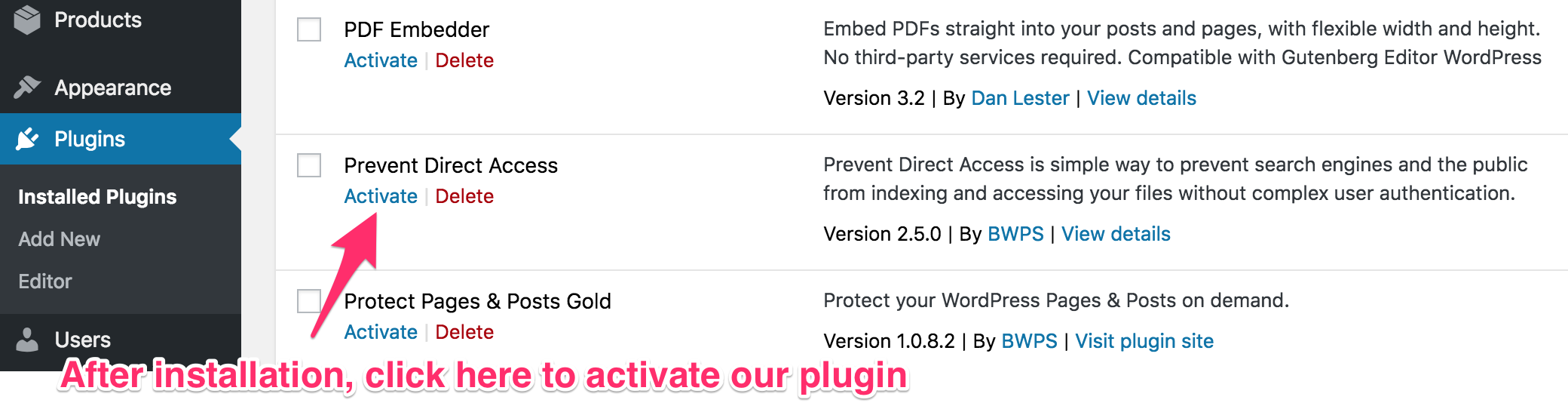
Once you have installed the plugin, click Activate
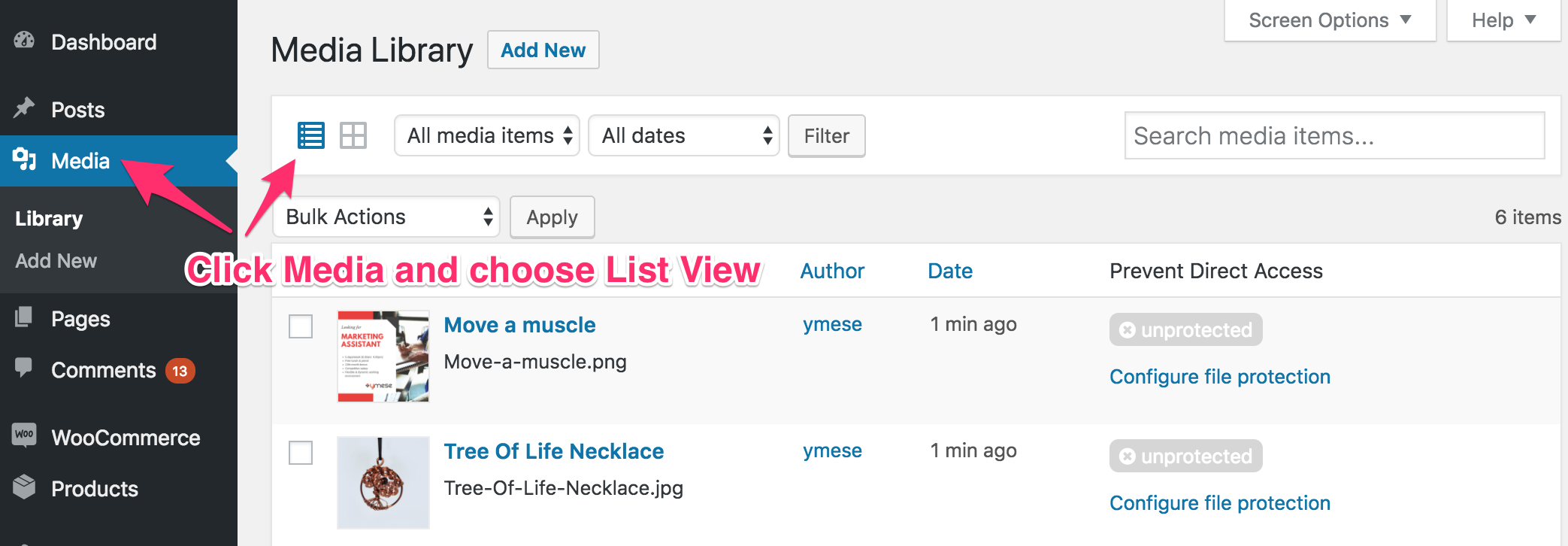
Go to Media to protect your files. Prevent Direct Access works best on List View.
There’s an extra column called "Prevent Direct Access" auto-generated by our plugin. Click on "Configure file protection" and start protecting your private file.
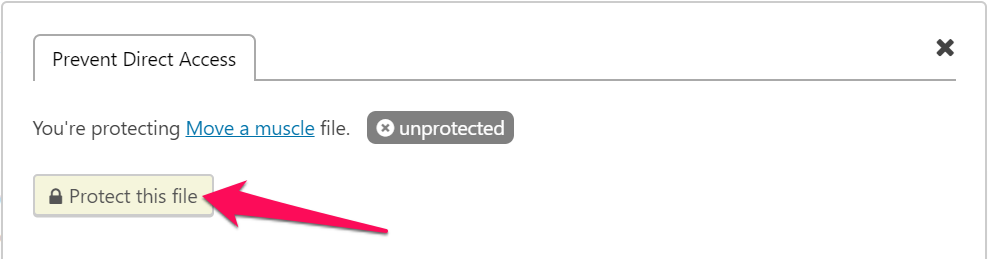
Click on "Protect this file" button to make the file private.
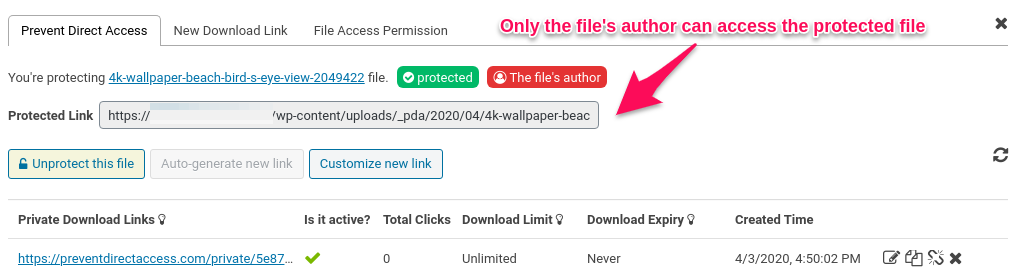
The file is now "protected". Its File Access Permission is set to "The file's author", which means it's accessible to the file's author only. Other users are able to access your protected file using a private download link.
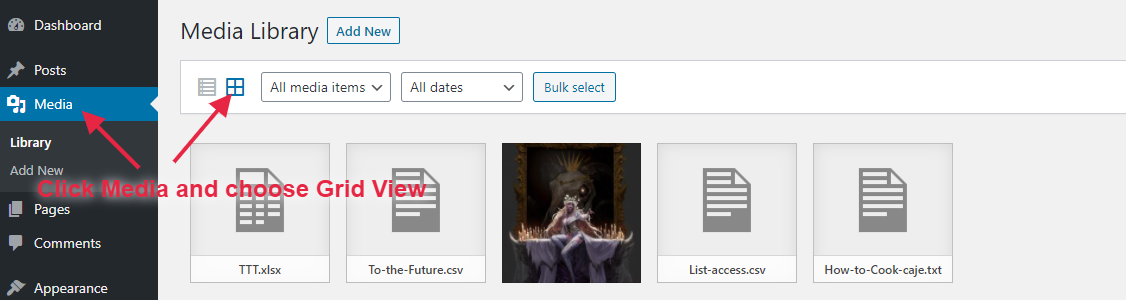
You can also protect your file under Media Grid View.
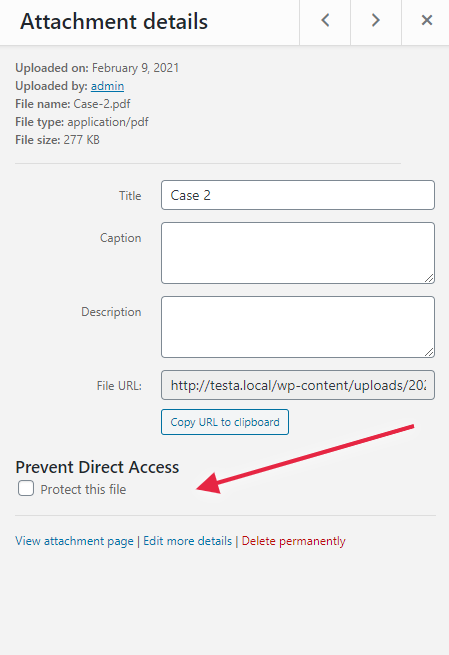
There’s an extra “Prevent Direct Access” option generated by our plugin under Attachment Details. Check the “Protect this file” box to protect your file.
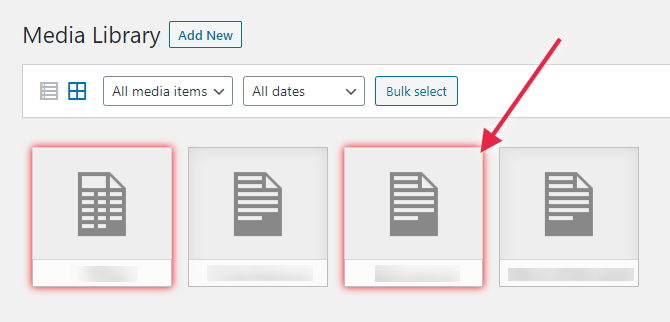
Once your file is protected, it’ll have a red border.
Why do I get this “Plugin could not be activated because it triggered a fatal error”?
It’s likely that you’re using an outdated version of PHP. Please check and upgrade the PHP version on your server to 5.6 or greater.
In fact, WordPress itself even recommends your host supports PHP version 7.2 or greater for security purposes.
Why nothing happens after I activate the plugin?
Prevent Direct Access supports websites hosted on Apache servers out of the box.
In case you’re using WP Engine or other NGINX servers, please check out this instruction on how to update the server configuration for our plugin (Both Lite and Gold version) to work as expected.
In case you’re using Internet Information Services (IIS) web server, please check out this instruction on how to update the server configuration for our plugin (Both Lite and Gold version) to work as expected.
Why do I see a warning message on top after activating the plugin?
The plugin needs to add some mod_rewrite rules to your website .htaccess file (located on your website root folder) to prevent direct access to your files on the server.
So it’s likely that your .htaccess is not writable (with at least 644 permissions; whose owner must be also accessible by your apache server such as www-data). If that’s the case, you must either make it writable or manually update your .htaccess with the mod_rewrite rules found under Settings > Permalinks.
How many files can I protect?
Since PDA Lite version 2.7.7, you can protect unlimited files under your Media Library.
Why can’t I use the plugin in multisite mode?
The Lite version of this plugin only supports Apache, Nginx, and IIS single sites. Multisite mode is supported in our Gold version with the PDA Multisite extension installed.

[Improvement] Enhanced overall code quality and strengthened security.
[Feature] Added a plugin deactivation feedback modal. Users are now prompted with a popup upon deactivation to select a reason, helping us collect valuable insights for further improvements.
2.8.8.4 Dec 23, 2025
[Feature] Added an onboarding Opt-In/Opt-Out screen on first plugin activation, allowing users to grant or deny analytics consent.
[Feature] Introduced GreyLayout for locked premium features, displaying all Gold features in the Free version as disabled/locked with clear labels.
[Improvement] Improved the initial setup flow to provide a clearer and more compliant user experience.
[Improvement] Refined the UI/UX to better distinguish between Free and Gold features.
2.8.8.3 Apr 23, 2025
[Improvement] Security: Restrict REST API access to file protection endpoints to admin users only.
2.8.8.2 Feb 26, 2025
[Bugfix] Resolved the developer tool alert issue for page builders.
2.8.8.1 Feb 17, 2025
[Bugfix] Fixed an issue with shortcut blocking and detection in developer tools prevention.
[Improvement] Enhanced security measures for generating unique strings.
2.8.8 Jan 28, 2025
[Improvement] Added customizable right-click alert with tooltip message.
[Improvement] Enhanced developer tools prevention with shortcut blocking and detection.
2.8.7 July 01, 2024
[Bug Fix] Resolved issues with Protection and Unprotection links for custom upload directories without year-month paths.
2.8.6.1 May 15, 2024
[Bugfix] Code improvements and optimizations
2.8.6 May 13, 2024
[Bugfix] Fixed Callback permission in rest api
2.8.5 September 11, 2023
[Improvement] Comprehensive code comment documentation has been added
[Improvement] Added text domains for strings in places where they were previously missing
[Improvement] Removed unnecessary commented-out code, ensuring a cleaner and more efficient codebase
[Improvement] The settings page sidebar has been revised to provide users with updated information and a helpful guide
2.8.4 April 07, 2023
[Fix] Free plugin not working if we have install premium plugin and activate the license and then deactivate the premium plugin
2.8.3 Dec 16, 2022
[Improvement] Disable right-clicks on iFrames
[Improvement] Show error messages when protecting deleted files
[Improvement] Show confirmation messages when protect/unprotect files under Media Library Grid View
2.8.2 August 25, 2022
[Improvement] Show alert messages when right-clicking on web pages
[Improvement] Disable more keyboard shortcuts
[Fix] Allow text input on Safari when disabling right-clicks
2.8.1 Jun 12, 2022
[New Feature] Restrict media files access to file’s authors only
[Improvement] Show warning messages on multisites
[Fix] Show non-latin characters in protected file names
2.8.0 April 20, 2022
[Improvement] Disable text selection and image drag-and-drop features
[Improvement] Disable content copy functions
[Improvement] Display alert message on mouse right click
2.7.10 February 9, 2021
[Refactoring] Secure input and output data
[Refactoring] Update Settings UI using WordPress built-in jQuery libraries
2.7.9 Jan 28, 2022
[New Feature] Provide an settings option to prevent right-clicking on all pages
[Improvement] Remove “Invite & Earn” submenu & UTM tags on the plugin author URI
2.7.8 December 6, 2021
Allow admins to access protected files whose FAP are “the file’s author” via a hook
Display success & error messages when saving IP Restriction settings
2.7.7 October 5, 2021
Allow protecting unlimited files with PDA Lite plugin
Improve UI: Remove disabled options
2.7.6 August 13, 2021
Update embedded documentation links in UI settings
Test compatibility with WordPress 5.8
Update GetResponse API 3.0
2.7.5 June 16, 2021
Provide hook to display PDF thumbnails in the Media Library
Fix error PHP log when updating a new PDA version
2.7.4 April 7, 2021
Show rewrite rules for IIS users
Improve UI: Hide PDA Gold features in the settings page
Remove error log
Show Configure pop-up under Media Library for all servers
2.7.3 February 10, 2021
Improve UI on settings page and show rewrite rules for Nginx users
Allow users to protect files under Media Library Grid View
2.7.2 December 18, 2020
Allow admin users to access protected files
2.7.1 August 24, 2020
Fix PHP notices with WP 5.5
2.7.0 June 16, 2020
PDA Gold requires PDA Lite
Un-protecting files don’t update _pda_protection value
Remove unused files & folders
Hide “upgrade to PDA Gold” notice if PDA Gold is active
Change the domain of translation
Do not support in multisite mode
2.6.0 April 3, 2020
Improve UI: compatible with WordPress 5.3
Allow the file’s author to access protected file by default
2.5.1.2 February 5, 2020
Improve UI: hide Like Plugin column in the settings page
2.5.1.1 November 16, 2019
Fix add_submenu_page PHP notice issue
2.5.1 November 7, 2019
Add feature “Prevent Image Hotlinking”
Prevent Google Indexing for private links
Fix file access permission when filename contains size
2.5.0.4 October 4, 2019
Improve UI under settings page
2.5.0.3 August 9, 2019
Update switch button under settings page
Show notification when saving settings successfully
2.5.0.2 May 16, 2019
Fix get lucky button
2.5.0.1 December 04, 2018
Fix typo
2.5.0 November 18, 2018
Revamp UI
2.4.0.1 August 10, 2018
Hot fix [] array declaration cannot work under PHP version < 5.4
2.4.0 June 14, 2018
Fix cannot remove rewrite rules when deactivate plugin
2.3.9 Tue, April 17, 2018
Fix “This plugin is not properly prepared for localization”
2.3.8 Thu, April 12, 2018
Apply localisation
2.3.7 Wed, February 28, 2018
Test WordPress 4.9.4
2.3.6 Wed, January 31, 2018
Fix undefined index when get option FREE_PDA_SETTINGS
2.3.5 Fri, January 26, 2018
Improve UI for settings page
2.3.4 Tue, January 23, 2018
Improve UI on settings page by revamping checkbox option
Integrate stop image hotlinking feature
Show information in order to know whether the file is protected
2.3.3 Mon, January 8, 2018
Revamp settings page
2.3.2 Wed, November 15, 2017
Fix wp::prepare warning messages when using in WordPress version 4.8.3.
2.3.1: Sat, November 4, 2017
Add warning messages when users are using a deprecated wp api plugin.
2.3: Thu, August 17, 2017
Protect files from search engine’s index
2.2: Wed, June 14, 2017
Add settings page
2.1.5: Thu, June 1, 2017
Notify users to upgrade to Gold version
Update plugin’s data after users remove media files
2.1.4: Mon, May 22, 2017
Change the way to get non-protected URL
Redirect to default 404 page if the file is protected
Support websites hosted on WP Engine
2.1.3: February 25, 2017
Tweak: Change the plugin’s logic to cater for those files that couldn’t be found in the _postmeta table
2.1.2
Fix Twitter, Google Plus and Facebook open graph issue
2.1.1
Fix .htaccess rules to recognize the special characters
Find in _postmeta table in case of cropped images via wordpress